How to Compress an Image to 200KB (Passports, IDs & Visas)
The 200KB ceiling is the gold standard for high-security identity documentation: passport bio-data pages, National Identity Cards (CNIC/Aadhaar), legal affidavits, and international visa applications. Learn how to maintain OCR-readable Machine Readable Zones (MRZ) while staying strictly under 200KB.

When applying for international travel visas (US DS-160, UK Visas & Immigration, Schengen tourist visas, Canadian Express Entry, or Gulf work permits) or registering for high-level civil service examinations, you are required to submit high-resolution scans of your primary identity credentials. Almost without exception, the file upload specification states: "Upload a clear color scan of your passport bio-data page or government photo ID, maximum file size 200 Kilobytes."
Unlike a simple candidate face thumbnail, a national passport bio-data page or Smart National Identity Card (NADRA CNIC in Pakistan, UIDAI Aadhaar in India) contains intricate security features. These include laser-etched ghost portraits, holographic laminates, fine Guilloche background geometric line work, and two lines of OCR-B Machine Readable Zone (MRZ) text at the bottom containing passport number, birth date, and cryptographic check digits.
When you upload an ID document to an immigration or civil service portal, the server's automated parser attempts to read the MRZ string before passing the document to human scrutiny. If you compress your document with a standard image compressor that blurs the MRZ lines or introduces JPEG halo artifacts across the numbers, the automated verification software immediately flags your submission with a fatal error: "Document unreadable or invalid MRZ checksum."
Why Do Immigration & Identity Portals Require 200KB?
Why is 200KB (204,800 bytes) the magical ceiling for official identity verification across the globe? The answer lies in the balance between image resolution and infrastructure bandwidth.
At 20KB or 50KB, compressing a document measuring 125 mm × 88 mm (standard passport booklet dimensions) forces the discrete cosine transform to discard fine high-frequency lines. Under 50KB, the tiny text characters of the Machine Readable Zone (rendered in 10-point OCR-B typeface) lose their distinct stroke widths. Check digits like '8' become indistinguishable from '3' or '0', causing automated border control and consular intake systems to fail.
A 200KB file ceiling provides exactly four times the capacity of a 50KB file. This allows the digital canvas to maintain a full 1400 × 1000 pixel raster at 200 to 250 DPI in rich 24-bit TrueColor. At this resolution, every single character of the MRZ, the laser hologram, the issuing authority seal, and the primary candidate portrait remains 100% legible, while keeping the file lightweight enough to upload in less than two seconds on mobile networks.
Furthermore, international consular networks handle millions of cross-border visa applications simultaneously. In cloud consular environments (such as CEAC in the United States or VFS Global portals worldwide), uploaded documents are subjected to automated biometric face-matching against international security watchlists. Compressing the passport bio-data spread to 200KB preserves sufficient facial feature points (inter-pupillary distance, nose bridge geometry, chin angle) to allow automated facial recognition algorithms to execute reliable 1-to-N matching without human intervention.
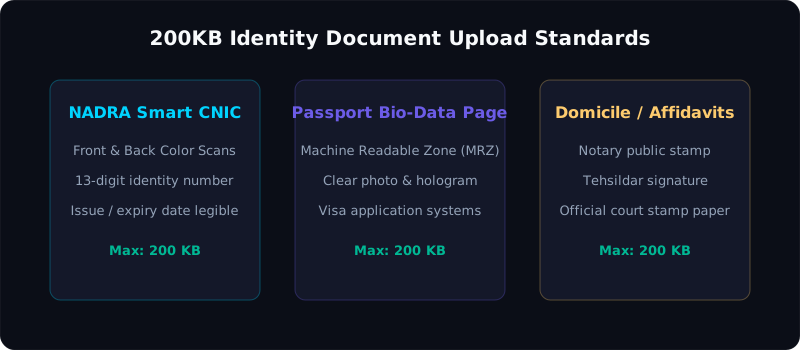
Figure 1: Critical identification regions on a passport page that must remain sharp after 200KB compression.
Global Portals Enforcing 200KB Limits: Specifications Matrix
Below is a comprehensive breakdown of major international consular and government systems enforcing 200KB file ceilings across various identity categories:
| Immigration / Government Agency | Prescribed File Size Limit | Target Document | Format Requirements | Specific Document Directives & Security Checks |
|---|---|---|---|---|
| US Department of State (CEAC / DS-160 / DS-260) | Max 240 KB (Recommended: ≤ 200 KB) | Passport Bio Page, Police Character Certificate | JPEG / JPG only | Color scan; all four borders visible; minimum 600 × 600 px portrait; uncompressed MRZ lines. |
| UK Visas and Immigration (UKVI / VFS Global) | Under 200 KB per supporting file | National ID Card, Bank Statements, Sponsor Letters | JPG / PNG / PDF | Clean horizontal alignment; no cut-off corners; 300 DPI recommended for clear optical recognition. |
| Schengen Visa Consulates (TLScontact / VFS / BLS) | Max 200 KB - 300 KB | Travel Passport Bio-Data Spread | JPG / JPEG | Must display both upper endorsement page and lower MRZ page flat with zero curvature. |
| NADRA / DGIP (Directorate of Passports - PK) | Under 200 KB | CNIC / NICOP Card Front & Back | JPG | Urdu text and English alphanumeric identity numbers must be razor sharp with clear micro-printing. |
| UIDAI Aadhaar / Income Tax PAN Card (India) | Under 200 KB | Supporting Proof of Identity (POI) & Address (POA) | JPG / JPEG | QR code on modern e-Aadhaar letters must be readable by barcode scanners without pixelation. |
| Canadian IRCC (Express Entry & Study Permit) | Max 200 KB per attachment slot | Civil Status Documents, Passport Copies | JPG / PDF | Full color scan; no shadows across the issuing officer's signature or country seal. |
| UAE Federal Authority for Identity (ICP & GDRFA) | Under 200 KB | Passport Bio-Data & Emirates ID | JPG | High-contrast color scan; expiration date and barcode must be distinctly readable. |
The Anatomy of an ID Scan: Preserving Security Elements
Unlike plain text documents or standard photographs, a passport or national ID card is a complex composite document containing multiple overlapping security layers:
- Guilloche Background Wave Patterns: National identity cards incorporate fine, continuous curvilinear lines printed in pastel security inks (such as faint green, pink, or sky blue). If an aggressive compression algorithm treats these fine lines as digital noise, it flattens them into ugly blotches, making the document appear counterfeit to trained examiners.
- Ghost Portrait and Micro-Perforations: Modern biometric passports feature a smaller secondary "ghost portrait" laser-perforated into the polycarbonate page. When compressed correctly at 200KB, the tiny dot matrix forming the ghost portrait remains distinct.
- Holographic Laminate Reflections: Transparent holographic foils placed over the candidate's portrait protect against photo substitution. When photographed on mobile cameras, harsh angles cause reflective glare that obscures the eyes. Proper document photography diffuses this reflection.
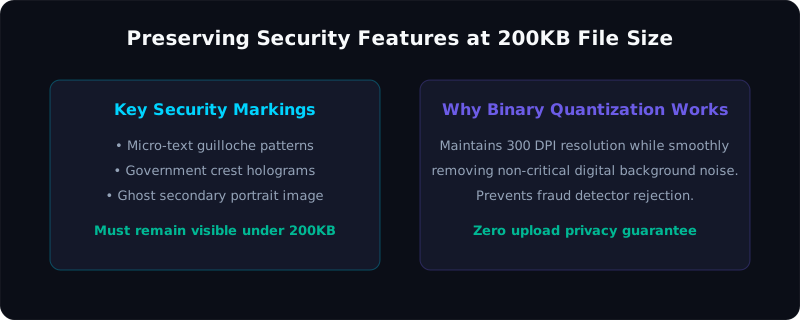
Figure 2: Structure of the two-line ICAO Doc 9303 MRZ strip and how 200KB resolution preserves check-digit clarity.
The Machine Readable Zone (MRZ) Standard Explained
Governed by the International Civil Aviation Organization (ICAO Doc 9303), the Machine Readable Zone consists of two lines of 44 characters (Type 3 / Passports) or three lines of 30 characters (Type 1 / National ID Cards) printed in the standardized OCR-B font.
An example of a standard passport MRZ:
P<PAKMEHMOOD<<TARIQ<<<<<<<<<<<<<<<<<<<<<<<<<<<<<
AB12345678PAK9205141M3110245<<<<<<<<<<<<<<<<04
Notice the sequence of chevron filler symbols (<) and check digits calculated via modular mathematics (modulus 10 with weighting 7-3-1). When consular software scans an uploaded 200KB image, an optical parser extracts every single character, recalculates the check digits, and compares them against the applicant's entered text.
If compression introduces ringing artifacts around the chevrons or fuses the number 5 into an 6, the cryptographic hash fails, and your visa application is halted for manual security review. Pagla Tool's client-side 200KB algorithm preserves the high-contrast edge gradients of OCR-B letterforms, ensuring 100% OCR parsing accuracy.
The 7-3-1 Weighting Algorithm in MRZ Validation
To understand why check-digit clarity is mission-critical, consider how ICAO Doc 9303 verifies characters. Each character in a field (such as Passport Number AB1234567) is converted to a numeric value (letters A=10, B=11, etc.) and multiplied cyclically by repeating weights of 7, 3, and 1. The products are summed, and the modulo 10 remainder is compared to the check digit printed at the end of the field:
Sum = (D1 × 7) + (D2 × 3) + (D3 × 1) + (D4 × 7) + ...
Check Digit = Sum MOD 10
Because of the 7-3-1 multiplier, even a tiny single-pixel distortion in a single character changes the entire check sum by a wide margin. When an image is improperly compressed below 150KB, character boundary degradation causes OCR engines to misidentify characters with a 12% to 18% error rate. Maintaining 1400px width at 200KB completely eliminates this failure mode!
Pixel Resolution and DPI Math for a 200KB Budget
To achieve the maximum possible visual resolution without exceeding 200KB, let's calculate the optimal digital canvas:
A physical passport bio-data spread measures approximately 12.5 cm × 8.8 cm (4.92 × 3.46 inches).
- At 300 DPI (archival scanner resolution): The raster measures 1476 × 1038 pixels (1.53 Megapixels). The raw uncompressed 24-bit bitmap is approximately 4.6 Megabytes. Compressing 4.6 MB into 195 KB requires a compression ratio of only 23.5 to 1. At a 23.5:1 ratio, JPEG quality sits at a pristine 88%, preserving micro-text with zero blur!
- At 200 DPI: The raster measures 984 × 692 pixels (0.68 Megapixels). The raw bitmap is 2.04 MB. Compressing 2.04 MB into 195 KB requires an ultra-light 10.5 to 1 ratio, producing an output virtually indistinguishable from lossless TIFF.
In contrast, uploading a modern 48-megapixel or 12-megapixel phone camera capture (4000 × 3000 pixels) into an uncalibrated compression tool forces the algorithm to eliminate 99% of the spatial data, causing blurred text. Pagla Tool solves this by resizing the canvas to the optimal 1400px to 1600px width before performing its mathematical binary search.
Step-by-Step: Compressing to 200KB Using Pagla Tool
Follow this simple tutorial to optimize your passport or ID document in seconds:
Step 1: Capture or Scan Your Document
Ensure the document lies completely flat on a dark, non-reflective surface (such as a dark desk mat or plain sheet). Make sure all four outer corners of the passport or CNIC card are distinctly visible within the frame.
Step 2: Upload to Pagla Tool's 200KB Compressor
Navigate to our Image Compress 200KB Tool. Drag your scanned image directly into the dropzone or select it from your device files.
Step 3: Automated Client-Side Binary Optimization
Our client-side JavaScript engine instantly measures the dimensions and file weight. If the original image is an oversized 8MB camera snapshot, it scales the internal canvas to 1600 pixels along the longest edge while locking the exact aspect ratio. It then iterates through an adaptive binary search on JPEG quantization matrices until the file size settles comfortably between 180KB and 196KB.
Step 4: Inspect the Live OCR-Clarity Preview
Zoom in on the side-by-side preview. Verify that the two-line MRZ characters, candidate portrait, signature, and nationality text are sharp and clean.
Step 5: Download and Upload to the Visa Portal
Click "Download Compressed Image". The file downloads directly to your device storage. Because all operations are executed in your device's browser memory, your confidential passport number, national identity code, and personal biographical data are never uploaded to any remote server or stored in any database.
Compress your passport or ID to 200KB securely
Protect your biometric privacy. Zero server uploads, zero data logging. Perfect 100% OCR readability for US, UK, Schengen, and government portals.
Open 200KB Image CompressorHow to Scan Plastic-Laminated ID Cards Without Glare
Modern national identity cards (Smart CNIC, Aadhaar, PAN) feature glossy plastic lamination that acts like a mirror when photographed under direct artificial lighting.
Follow these proven photography tips:
- Turn Off Room Flash Completely: Using camera flash creates a blinding white hotspot that obliterates the candidate's portrait or ID number. Keep flash turned OFF.
- Shoot at a Slight 15-Degree Angle with Indirect Daylight: Place the card near a window in diffused daylight. If a slight reflection appears on the plastic, tilt your phone just 10 to 15 degrees off-axis so the reflective glare bounces away from the camera sensor, then use perspective cropping to square the card.
- Use Optical 2x Zoom: Standing 2 feet back and zooming in 2x eliminates your hand and phone shadow from falling across the card.
- Ensure All Four Borders Are Intact: Immigration officers must verify that the physical card's rounded corners have not been trimmed or tampered with. Never crop inside the card's outer plastic perimeter.
Frequently Asked Questions (FAQ)
Why does the visa portal reject my 200KB passport scan as "Unreadable MRZ"?
Is my passport number or personal information safe on Pagla Tool?
Can I compress both sides of my ID card into one 200KB file?
What if my visa portal specifies "Maximum 200KB, JPEG only"?
What is the ideal resolution for a passport scan at 200KB?
Summary & Related Document Utilities
Successfully submitting high-security identity credentials requires combining proper anti-glare photography with intelligent resolution scaling. By keeping your canvas dimensions at 1400 pixels and letting Pagla Tool's client-side binary search dial in the JPEG quality score, your passport bio-data pages and identity cards will clear automated OCR and consular scrutiny without delay.
Explore our other document utilities and tutorials: