How to Make a Photo 100KB for Job Applications (Complete Guide)
A complete guide to optimizing scanned educational marksheets, university degree certificates, domicile affidavits, and applicant portraits to under 100KB without blurring critical roll numbers or official stamps.

Applying for government employment, banking positions (SBI, IBPS, HBL, Allied Bank), or corporate careers requires much more than simply submitting a headshot. Modern multi-stage employment recruitment portals require candidates to upload comprehensive dossiers of supporting documents: Matriculation/Secondary School Examination (SSE) certificates, Intermediate Marksheets, Bachelor's and Master's Transcripts, Experience Letters, Domicile Certificates, and National Identity documentation.
Almost universally, these document upload slots specify an upper restriction: "File size must not exceed 100 Kilobytes." While a portrait photo at 100KB looks extraordinarily crisp, compressing a full A4-sized academic certificate containing over 500 words of fine alphanumeric text, course codes, percentage marks, and a registrar's embossed stamp down to 100KB presents a serious technical challenge.
If your compression is uncalibrated, fine text turns into illegible gray smudges. During document scrutiny, human verification officers or optical character recognition (OCR) intake pipelines will reject your application for "Unreadable Supporting Documentation." In this comprehensive guide, we examine the physics of document compression, explain how to optimize text clarity, and demonstrate how to compress certificates to exactly 95KB using Pagla Tool's client-side image engine.
Why Do Job Applications Demand Exactly 100KB?
In large-scale public recruitment drives—such as the Union Public Service Commission (UPSC) in India, the Federal Public Service Commission (FPSC) in Pakistan, or nationalized bank PO recruitments—a single vacancy notification often attracts over 800,000 qualified applicants.
Each applicant must upload between 4 and 8 distinct documentary proofs: 10th marksheet (date of birth proof), 12th certificate, degree diploma, caste/reservation certificate, domicile, and photo ID. If 800,000 candidates each uploaded five 3-megabyte camera photos, the recruitment portal's storage cluster would have to store and index 12 terabytes of uncompressed image data for a single job drive.
By capping document uploads at 100KB (102,400 bytes), government servers reduce their aggregate storage requirement by over 96%, ensuring database backups can be generated in real time. Moreover, during the centralized document verification (DV) stage, recruitment officers can open applicant files instantly without waiting for heavy megabyte downloads across internal government intranets.
In modern cloud-backed portal architectures, state service commissions employ Content Delivery Networks (CDNs) and object storage buckets (such as Amazon S3 or private government OpenStack clusters). Storing tens of millions of candidate assets incurs continuous egress bandwidth costs. Restricting candidate documents to 100KB keeps portal operating costs manageable while ensuring rapid synchronization across district testing centers and regional interview boards.
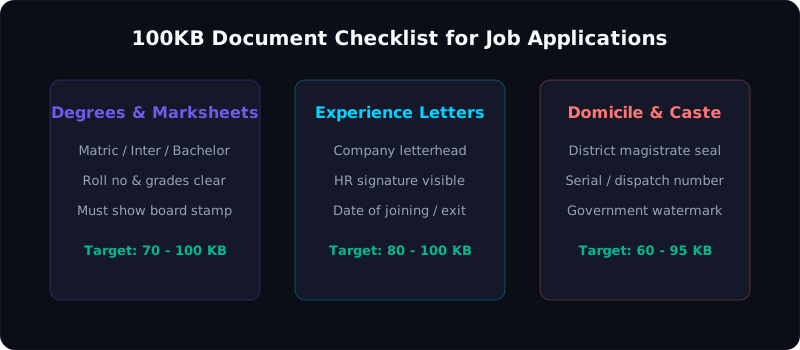
Figure 1: Strategic visual compression zones on academic certificates: prioritizing roll numbers and verification stamps.
Major Job Portals Enforcing the 100KB Threshold
A wide variety of state, federal, and banking recruitment portals mandate that candidate documents remain strictly under 100KB. Below is an authoritative summary across major examination and recruitment bodies:
| Recruitment Agency / Organization | Prescribed File Size Range | Target Documents | Accepted Formats | Critical Verification Details |
|---|---|---|---|---|
| IBPS (Institute of Banking Personnel Selection) | 50 KB to 100 KB | Left Thumb Impression & Hand-written Declaration | JPG / JPEG | Declaration text must be written in English only; no block letters. Thumb impression must show clear ridge lines. |
| UPSC Online Application Portal (ORA) | Under 100 KB (Photo ID / Certificate) | Degree Certificates, Matric Proof, Category Certificate | PDF or JPG | Must clearly display university registration number, date of award, and gazetted attestation seal if required. |
| State Public Service Commissions (BPSC, PPSC, KPPSC, MPPSC) | 50 KB to 100 KB | Domicile, Educational Marksheets, CNIC / Aadhaar | JPG / JPEG | Attestation stamps from a Gazetted Officer (Grade 17+) must be distinct, with readable officer designation. |
| Corporate HR Portals (TCS iON, Infosys, Wipro, HCL) | Max 100 KB per attachment | Government Photo ID, Semester Marksheets, Offer Letters | JPEG / PNG | All four corners of the physical document must be within the frame; no trapezoidal perspective tilt. |
| Higher Education Attestation Portals (HEC Pakistan, WES) | Max 100 KB per page scan | Transcript of Records, Provisional Certificates | JPG / PDF | Credit hours, GPA, and controller of examinations signature must be sharp and free of compression artifacts. |
| Secondary Boards (CBSE, FBISE, BISE Lahore, Maharashtra Board) | Under 100 KB | Migration Certificates, Marksheets | JPG / JPEG | Mother's and Father's full names, candidate date of birth, and serial numbers must be crisp. |
Text vs Photo Compression: The Physics of High-Contrast Documents
Compressing a document certificate is fundamentally different from compressing a human portrait. Photographic portraits feature soft transitions between skin tones, hair gradients, and clothing colors. The JPEG discrete cosine transform (DCT) algorithm was invented specifically for such continuous-tone imagery, discarding subtle color variations without human viewers noticing.
In contrast, an academic marksheet or legal domicile is high-frequency, high-contrast imagery: black typography (such as "Roll No: 849201" or "Grade: A+") positioned against a white or ivory paper sheet. When traditional lossy compression is applied aggressively:
- Gibbs Phenomenon (Ringing Artifacts): The sharp transition between black letters and white paper causes oscillating mathematical waves in the 8×8 DCT block, creating dark halos around numbers and letters.
- Text Smearing: Thin numerical characters (such as the number '1' vs '7', or '3' vs '8') fuse into indistinguishable blobs, leading to immediate disqualification during document scrutiny.
- Security Watermark Destruction: Anti-counterfeiting guilloche patterns and university seal impressions are mistaken for digital noise and flattened out.
To maintain text integrity under 100KB, the image must undergo intelligent resolution scaling, selective contrast stretching, and chroma subsampling optimization before the JPEG compression matrix is finalized.
Optical Character Recognition (OCR) Verification
Modern government recruitment platforms no longer rely solely on human scrutiny officers to verify candidate marks. State examination boards now feed uploaded certificates directly into automated OCR pipelines (often powered by Google Vision API or internal Tesseract neural models).
If your certificate is compressed using a substandard tool that blurs letter kerning, the OCR engine may transcribe your marks as "58%" instead of "68%". When this discrepancy is compared against the self-reported percentage on your application form, the system flags your record for manual investigation or automated disqualification. Keeping high-contrast, razor-sharp letterform edges at 100KB is essential to guarantee accurate algorithmic parsing.
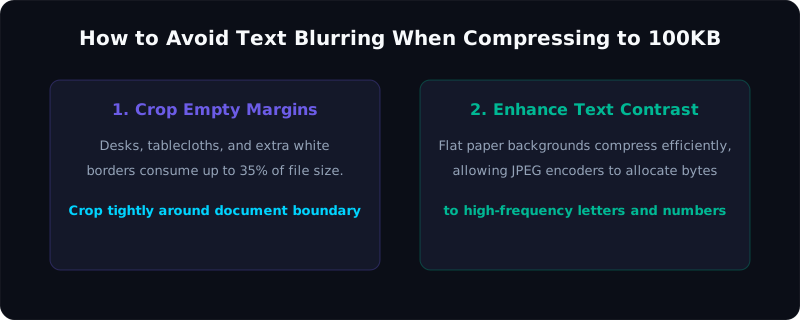
Figure 2: Eliminating mobile phone camera glare and perspective skew before compressing certificates to 100KB.
Ideal Canvas Dimensions & DPI for A4 Certificates at 100KB
How large can an A4 certificate be while remaining safely under 100KB? Let's analyze the exact mathematics:
An international standard A4 document measures 210 mm × 297 mm (8.27 × 11.69 inches).
- At 300 DPI (high-end flatbed scanner resolution): The canvas measures 2480 × 3508 pixels (8.7 Megapixels). The raw bitmap weighs 26.1 MB! Squeezing 26.1 MB into 100 KB requires an extreme 260:1 compression ratio, ruining small 8pt typography.
- At 150 DPI (optimal digital document resolution): The canvas measures 1240 × 1754 pixels (2.17 Megapixels). The raw bitmap weighs 6.5 MB. Compressing 6.5 MB into 95 KB requires a moderate 68:1 ratio, keeping 8pt and 10pt typography sharp and legible!
- At 100 DPI (compact web resolution): The canvas measures 827 × 1169 pixels. The raw bitmap is under 2.9 MB. A 95KB file at this resolution enjoys an ultra-gentle 30:1 compression ratio, ensuring virtually lossless text sharpness.
When you upload an image into the Pagla 100KB Tool, our client-side script automatically scales the longest edge to 1600 pixels if it exceeds that threshold. This guarantees maximum typographic clarity while guaranteeing that the file size settles comfortably between 90KB and 98KB.
Grayscale vs Color Tradeoffs for Certificates
A scanned 24-bit color image stores three 8-bit bytes per pixel (Red, Green, Blue). An 8-bit grayscale image stores only one byte per pixel. By converting a black-and-white certificate (or an affidavit printed in black ink) from color to grayscale, you instantly slash the uncompressed raw byte count by 66.7%!
This massive reduction in raw byte weight means that the 100KB budget can be dedicated almost entirely to resolution rather than color palette storage. A grayscale scan at 100KB can preserve 200 DPI resolution with virtually zero artifacting. However, if your document includes a red stamp or a blue ink sign-off that must be validated, maintain 24-bit RGB mode and rely on Pagla Tool's adaptive canvas downscaling instead.
Step-by-Step Guide: Compressing to 100KB with Pagla Tool
Follow these five simple steps to compress any document, certificate, or candidate photo to under 100KB:
Step 1: Crop Unnecessary Borders
If you took a photograph of your certificate lying on a wooden table or bedsheet, use your phone's built-in gallery tool to crop away all wooden desk margins. The image frame should contain strictly the paper certificate from corner to corner. Cropping away the table background eliminates 30% to 40% of useless pixel data immediately!
Step 2: Upload to Pagla Tool's 100KB Compressor
Open the Image Compress 100KB Tool. Drag your photo into the dropzone or tap "Choose Image from Device". The tool accepts JPG, PNG, and WebP files.
Step 3: Automated Client-Side Binary Optimization
In less than one second, our JavaScript engine measures the image payload and executes an adaptive binary search across JPEG quality settings. If the document is an oversized 12-megapixel smartphone camera shot, it downscales the internal canvas proportionally, protecting text edges while targeting an output size between 92KB and 98KB.
Step 4: Check Legibility in the Live Preview
Zoom in on the live preview screen. Verify that your roll number, candidate name, marks/percentages, and the controller's signature remain sharp and distinct.
Step 5: Download and Submit
Click "Download Compressed Image". The file is saved directly to your local device storage. Because processing occurs 100% in your browser, your confidential academic records and private identification numbers are never transmitted over the internet.
Compress your job documents to 100KB right now
Keep your roll numbers, university stamps, and signatures crystal clear. 100% private in-browser processing with zero server uploads and zero data logging.
Open 100KB Image CompressorHow to Photograph Certificates on Your Phone Without Glare
Many job applicants do not own a flatbed scanner and rely on their smartphone camera. To produce a scan that looks like it came from an office scanner:
- Never Use the Camera Flash: Using a camera flash on laminated or glossy certificates creates a bright white reflection right across the text, obliterating roll numbers or course titles. Always turn the flash OFF.
- Shoot Flat from Directly Above: Place the certificate flat on a table near a window. Stand directly over it, holding your phone parallel to the paper so that all four corners form a true rectangle without keystoning or trapezoidal perspective distortion.
- Avoid Overhead Room Light Shadows: If your body casts a shadow over the paper, take a step back and zoom in 1.5x to 2x using your phone's optical telephoto lens. This keeps your shadow completely off the document while eliminating wide-angle lens edge distortion.
- Flatten Laminated Creases: If the certificate was folded in an envelope, press it gently under a heavy book for five minutes before photographing to ensure all lines of text sit in the camera's depth of field.
Top 5 Reasons Scanned Documents Get Rejected at 100KB
Scrutiny boards at UPSC, FPSC, and banking recruitment agencies routinely disqualify candidate dossiers due to avoidable formatting errors:
- Illegible Roll Numbers or Passing Years: Automated scrapers and human clerks check the uploaded marksheet against the data entered in your application form. If the passing year or candidate roll number is blurred beyond immediate legibility, the application is flagged as defective.
- Cropped Off-Borders & Missing Seals: The official university emblem, registration watermark, and the signature of the Controller of Examinations must be fully inside the frame. Cropping them out raises suspicion of document tampering or fraud.
- Upside-Down or Rotated Orientation: Submitting a document in landscape orientation when it should be portrait forces the scrutiny officer to manually rotate it. Many automated portal viewers do not support rotation and reject rotated files outright.
- Submitting Multi-Page Documents as a Single 100KB JPEG: If an application requires all 8 semesters of marks in one file, compressing 8 pages into a single 100KB image turns the entire document into an unreadable gray mist. In such cases, use our JPG to PDF Converter to compile the pages into an authentic multi-page PDF document.
- Wrong Color Mode: Converting an original color certificate into a harsh 1-bit black-and-white thresholded file can wipe out red or blue ink verification stamps. Keep the document in standard RGB or rich 8-bit grayscale.
Frequently Asked Questions (FAQ)
Can I compress both photos and scanned certificates to 100KB?
Will compressing my marksheet to 100KB blur my grades and roll number?
Is it safe to upload confidential degrees and ID proofs to Pagla Tool?
What if the job portal requires a PDF file under 100KB instead of a JPG?
What should I do if my compressed image is 102KB?
90 to stay safely beneath the ceiling.
Final Recommendations & Useful Links
Document verification is the gateway to your professional career. Never let an unreadable 100KB document or improper aspect ratio jeopardize months of hard exam preparation. Follow proper lighting techniques, crop away background margins, and rely on client-side optimization to generate flawless application files.
Check out our related document tools and guides: