Is It Safe to Use Online Image Tools? Complete Privacy & Security Guide
An authoritative cybersecurity investigation into where your uploaded documents actually travel, the risks of cloud converters, and why client-side WebAssembly guarantees absolute privacy.
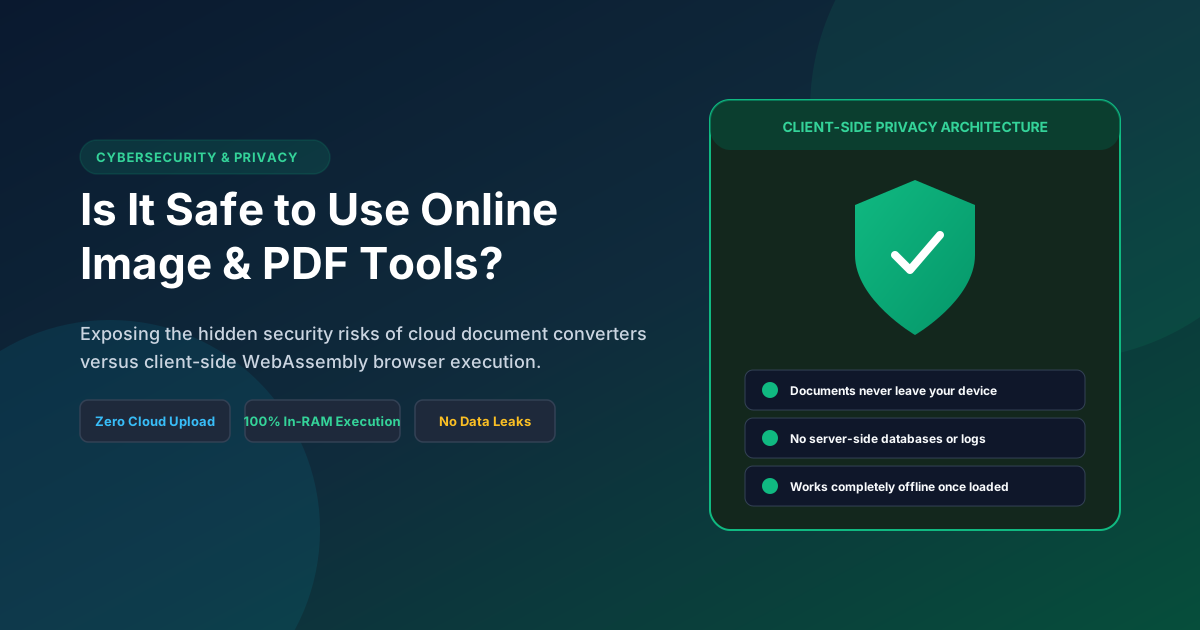
Table of Contents
- 1. The Hidden Economics of "Free" Online Converters: If You Aren't Paying, What Are You Giving Up?
- 2. Inside the Cloud Pipeline: What Actually Happens When You Click "Upload"
- 3. The Myth of the "1-Hour Deletion Guarantee": Ghost Data & Backup Snapshots
- 4. High-Stakes Risks: CNIC, Aadhaar, Signatures, and Biometric Identity Theft
- 5. The Client-Side Revolution: How WebAssembly & HTML5 Canvas Redefined Privacy
- 6. How to Audit Any Website Yourself: The 60-Second Network Tab Inspection
- 7. The Pagla Tool Zero-Knowledge Architecture: Built Private by Design
- 8. Security Comparison Matrix: Cloud Tools vs Native Software vs Client-Side Web
- 9. Frequently Asked Questions (FAQ)
- 10. Conclusion & Essential Document Privacy Rules
2. Inside the Cloud Pipeline: What Actually Happens When You Click "Upload"
To grasp why traditional online converters pose serious cybersecurity risks, one must examine their underlying network architecture:

The Journey of Your Document on a Cloud Converter:
- Transit Across the Public Web: Your high-resolution certificate or national ID card is serialized into a binary stream and transmitted via an
HTTP POSTrequest across multiple intermediary internet exchange points, CDN edge nodes, and reverse proxies. - Writing to Physical Remote Disk: Upon reaching the cloud server (often hosted on AWS, DigitalOcean, or unverified shared hosting in overseas jurisdictions), the server writes your file directly to a temporary disk directory (e.g.,
/var/www/uploads/tmp_8192a_cnic.jpg). - Backend Server Execution: A server-side script (written in PHP, Python, or Node.js) invokes an underlying binary (like ImageMagick or Ghostscript) to resize or convert the file.
- Storage in Cloud Object Buckets: The processed output is stored in a publicly accessible cloud storage bucket (e.g. an Amazon S3 bucket) and assigned a public URL (e.g.,
https://files.freepdftool.com/d/8192a_cnic.pdf) so you can download it.
At every step of this journey, your confidential personal documents exist on infrastructure that you do not own, manage, or control.
3. The Myth of the "1-Hour Deletion Guarantee": Ghost Data & Backup Snapshots
Most popular online file converters prominently display reassuring promises in their footers: "Your files are 100% confidential and automatically deleted from our servers after 1 hour."
As cybersecurity and systems architects know, true data destruction on modern cloud infrastructure is rarely so neat or immediate:
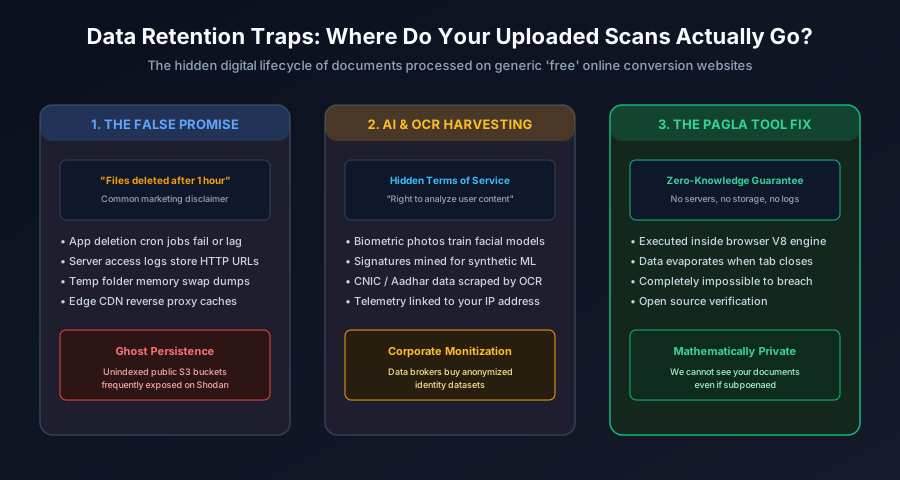
- Scheduled Cron Job Failures: Server deletion relies on background cron jobs. When server traffic spikes or background processes hang, files remain on disk for days, weeks, or indefinitely.
- Automated Cloud Backups: Cloud instances take automated daily and hourly snapshots. If your passport scan was present on the server when a snapshot was created, a copy is preserved permanently in the host's long-term backup archive.
- Exposed S3 Buckets: Security researchers routinely discover thousands of misconfigured, publicly accessible cloud storage buckets containing hundreds of thousands of tax returns, passport copies, and salary certificates uploaded to "free" conversion utilities.
- Intermediate Reverse Proxy Caches: Cloudflare or NGINX proxy caches between the user and the server can store cached copies of static assets long after the origin server deletes the file.
4. High-Stakes Risks: CNIC, Aadhaar, Signatures, and Biometric Identity Theft
Uploading a generic wallpaper or holiday snapshot to a cloud tool carries minimal consequence. However, candidates filling out job and exam applications are uploading the most sensitive identity records of their lives:
1. National Identity Cards (Pakistani CNIC / Indian Aadhaar)
Your national ID card contains your full legal name, father's/husband's name, permanent residential address, date of birth, biometric photo, and unique 12 or 13-digit identity number. Cybercriminals use stolen ID scans to open fraudulent bank accounts, secure unauthorized micro-loans, purchase untraceable mobile SIM cards, and commit digital identity theft.
2. Digital Signatures
A high-contrast scan of your official legal signature is exceptionally dangerous in the wrong hands. It can be composited onto fraudulent affidavits, property transfer deeds, bank checks, and employment contracts.
3. Biometric Facial Photographs
In the modern era of generative artificial intelligence, clear, high-resolution biometric passport portraits are intensely sought after. Malicious actors use them to train Deepfake facial recognition bypass models and forge synthetic biometric identities.
The "Golden Privacy Rule" of Document Handling
Never, under any circumstances, upload your National Identity Card (CNIC/Aadhaar), passport identification page, tax returns, bank statements, or official legal signature to any website that performs server-side processing.
5. The Client-Side Revolution: How WebAssembly & HTML5 Canvas Redefined Privacy
Until recently, client-side browser document processing was impossible. Early web browsers lacked the memory capacity and computational power to perform complex image resampling, JPEG quantization, or binary PDF parsing locally. Heavy work had to be offloaded to remote cloud servers.
Over the past five years, two breakthrough web standards revolutionized digital imaging:
A. HTML5 2D Canvas & WebGL Acceleration
Modern browsers can allocate hardware-accelerated 2D raster matrices directly in local device RAM. Through JavaScript APIs such as createImageBitmap(), canvas.toBlob(), and OffscreenCanvas, browsers can downscale, crop, filter, and compress 20-megapixel images in milliseconds using your own phone's GPU.
B. WebAssembly (WASM) & Client-Side PDF Engines
WebAssembly enables compiled C/C++ and Rust binaries to run inside the browser at near-native execution speed. Libraries like pdf-lib and Mozilla's pdf.js allow complex, multi-page PDF documents to be merged, decrypted, rasterized, and compiled directly inside your browser's V8 or JavaScriptCore virtual machine—with zero bytes transmitted over the network.
6. How to Audit Any Website Yourself: The 60-Second Network Tab Inspection
You do not need to take any website's privacy claims on blind faith. You can verify whether a tool is truly private using your own web browser in less than a minute:
The 60-Second DevTools Privacy Verification Test
- Open the tool page in Google Chrome, Microsoft Edge, Firefox, or Brave.
- Press F12 (or right-click anywhere on the page and select Inspect) to open Developer Tools.
- Click on the Network tab at the top of the DevTools panel.
- Click the small filter button labeled Fetch/XHR (this isolates all background data requests sent to remote servers).
- Drag and drop your document into the tool and click convert/compress.
- Analyze the Results:
- If the tool is UNSECURE (Cloud-based): You will see a massive
POSTrequest appear (often 3MB to 10MB in size) uploading your file to a remote URL, followed by another request downloading it back. - If the tool is SECURE (Pagla Tool Client-Side): The Network tab remains completely blank. Zero bytes leave your device. The entire conversion happens instantaneously in local memory.
- If the tool is UNSECURE (Cloud-based): You will see a massive
The "Offline Airplane Mode" Test
An even simpler test: Load Pagla Tool's 50KB Compressor or JPG to PDF Converter. Once the page is rendered, turn off your Wi-Fi or turn on Airplane Mode. Drag your photos into the tool. It will compress, crop, and generate downloads flawlessly without any internet connection whatsoever—ironclad proof that no server is involved.
7. The Pagla Tool Zero-Knowledge Architecture: Built Private by Design
Pagla Tool was engineered from day one to eliminate the privacy vulnerabilities that plague traditional utility platforms:
- Zero Server Uploads: Every single tool on Pagla Tool (including all image compressors, the passport photo maker, signature resizer, JPG-to-PDF, and PDF-to-JPG engines) runs 100% inside your client browser.
- Self-Hosted Open-Source Engines: All vendor libraries (Three.js, pdf-lib, pdf.js) are hosted locally on our domain in
/assets/vendor/. We never call external, third-party CDN scripts that could track your browsing behavior. - Ephemeral Memory Lifecycle: Your files exist only in your browser's temporary working RAM. The exact moment you close or refresh the browser tab, that memory is instantly garbage-collected and permanently destroyed by your operating system.
- Zero Database Footprint: We maintain no backend user databases, no file storage directories, and no user accounts. We cannot access your documents even if compelled by law, because we never possessed them in the first place.
8. Security Comparison Matrix: Cloud Tools vs Native Software vs Client-Side Web
Compare the cybersecurity and operational trade-offs of the three primary approaches to document editing:
| Security & Operational Dimension | Cloud Converters (e.g. iLovePDF, TinyPNG) | Native Desktop Software (e.g. Photoshop, GIMP) | Pagla Tool (Client-Side WASM / Canvas) |
|---|---|---|---|
| Document Privacy Level | Poor (Exposed to remote servers & S3) | Maximum (100% on local hard drive) | Maximum (100% on local device RAM) |
| Data Leak Vulnerability | High (Server breaches & cloud leaks) | Zero (Unless local malware present) | Zero (Zero network transit) |
| Software Installation Required? | No | Yes (Heavy desktop software & license) | No (Instant access via browser) |
| Mobile Phone Compatibility | Universal | Very poor / Non-existent | Flawless on iOS & Android |
| Cost & Subscriptions | Freemium / Monthly Paywalls | Expensive ($20–$50/month) | 100% Free & Open-Access |
| Works Completely Offline? | Impossible | Yes | Yes (After initial page load) |
9. Frequently Asked Questions (FAQ)
Do traditional online file compressors save copies of my uploaded documents?
Yes, on traditional cloud-based conversion websites, your file must be physically uploaded to their remote backend server (via an HTTP POST request) to allow server-side software (like ImageMagick, Ghostscript, or Python libraries) to process the image. Even when companies claim to delete files after one hour, copies often persist in server temporary directories, access logs, cloud backup snapshots, and intermediate CDN caching layers.
How does Pagla Tool guarantee that my personal photos and documents are not uploaded?
Pagla Tool operates on a 100% client-side architecture. When you drop an image or PDF onto our tools, the file is read directly into your web browser's local sandbox memory (V8 JavaScript RAM) using HTML5 FileReader and WebAssembly APIs. All canvas transformations, JPEG binary compression, and PDF compilation execute locally on your device's CPU/GPU. Zero network packets containing your document are transmitted to our servers.
How can I verify that a website is actually processing files on my computer rather than uploading them?
You can verify client-side processing using your browser's Developer Tools. Press F12 (or right-click and select Inspect), navigate to the Network tab, and filter by 'Fetch/XHR'. When you drag a file into Pagla Tool, you will see zero outgoing POST requests carrying multi-megabyte payloads. Furthermore, you can disconnect your internet connection entirely after loading the page, and all tools will continue to compress and convert your files with zero interruption.
What are the primary risks of uploading national ID cards (CNIC/Aadhaar) to free cloud tools?
National identity documents contain permanent, sensitive personal identifiers: 13-digit identity numbers, family tree links, home addresses, dates of birth, and biometric photos. If stored on insecure third-party cloud servers, these documents are vulnerable to database breaches, rogue server administrators, unauthorized AI model training, and automated OCR harvesting for financial identity theft or SIM card fraud.
Does client-side document processing work on mobile phones and low-end laptops?
Yes. Modern mobile browsers (including Google Chrome on Android and Safari on iOS) feature hardware-accelerated 2D canvas engines and high-performance WebAssembly runtimes. Even modest budget smartphones process high-resolution document scans and compress JPEGs in 200 to 500 milliseconds without requiring server assistance.
10. Conclusion & Essential Document Privacy Rules
In an increasingly digital world where personal identity theft and data harvesting continue to escalate, digital convenience should never come at the expense of your fundamental privacy. By understanding network architecture and switching to client-side, zero-knowledge utilities, you ensure your sensitive documents remain under your absolute control.
Essential Document Privacy Pre-Flight Rules
- ✓ Always Verify Client-Side Execution: Inspect the browser Network tab or test offline in Airplane Mode before processing sensitive records.
- ✓ Never Upload National ID Cards to Cloud Servers: Keep CNIC, Aadhaar, and passport scans strictly on local client runtimes.
- ✓ Protect Signatures: Avoid uploading isolated signature crops to unverified conversion websites.
- ✓ Close Tabs When Finished: Closing your browser tab ensures working RAM memory is instantly purged by the operating system.
- ✓ Advocate for Zero-Knowledge Tools: Choose and recommend platforms built on client-side WebAssembly architectures like Pagla Tool.