CNIC Photo and Document Upload Tips: NADRA, FPSC & PPSC Exam Guide
Master the art of digitizing Pakistani Computerized National Identity Cards. Eliminate glare, capture all four rounded corners, merge front and back sides, and compress down to 25KB without rejection.
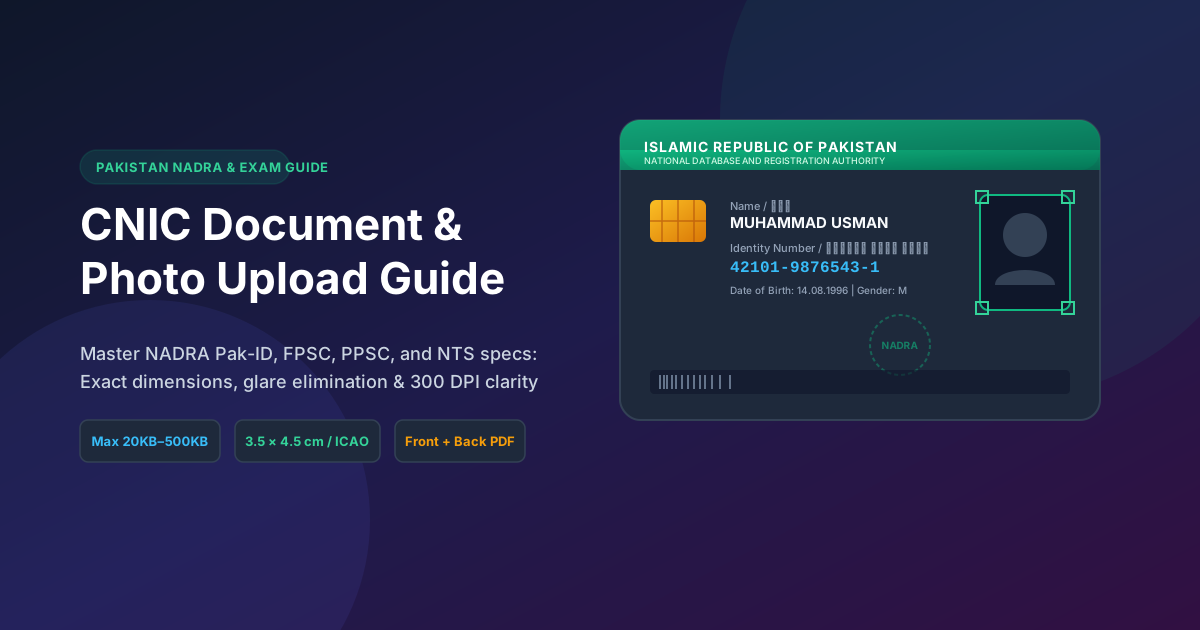
Table of Contents
- 1. The Architecture of Pakistan's CNIC: ISO/IEC 7810 ID-1 Physical Standards
- 2. NADRA Pak-ID Online System: Biometric Photo & Document Specifications
- 3. Provincial & Federal Portals: Strict 25KB Quotas and Front/Back Merging
- 4. The Three Deadly Sins of CNIC Scanning (and How to Avoid Them)
- 5. How to Merge Front and Back Sides onto One Page Perfectly
- 6. Digital Security: Masking Sensitive Fields on Public Job Boards
- 7. Step-by-Step Practical Mobile Workflow for Flawless Scans
- 8. Pakistani Recruitment & Admission Portals: Comprehensive Specification Matrix
- 9. Frequently Asked Questions (FAQ)
- 10. Conclusion & Pre-Upload CNIC Verification Checklist
1. The Architecture of Pakistan's CNIC: ISO/IEC 7810 ID-1 Physical Standards
The Pakistani Computerized National Identity Card (CNIC), whether the older laminated card or the modern microchip-embedded Smart National Identity Card (SNIC) issued by the National Database and Registration Authority (NADRA), is built according to rigorous international dimensional standards.
It adheres strictly to the ISO/IEC 7810 ID-1 physical specification (the identical dimensional footprint utilized by international credit cards and European identity cards):
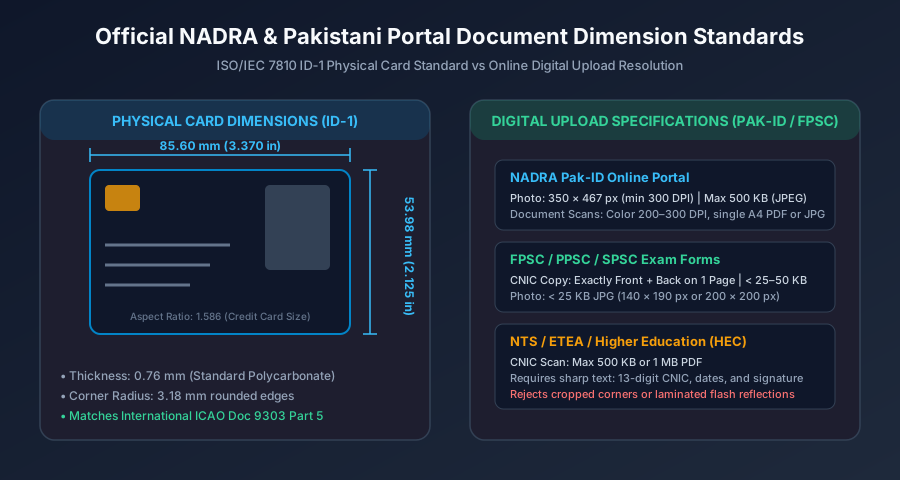
- Width: Exactly 85.60 millimeters (3.370 inches)
- Height: Exactly 53.98 millimeters (2.125 inches)
- Corner Radius: 3.18 millimeters rounded corners
- Aspect Ratio: Approximately
1.586(a 79:50 proportional ratio) - Substrate: Multi-layer polycarbonate featuring laser engraving, micro-printing, Guilloche security patterns, and optical variable ink (OVI).
Understanding this geometry is crucial because portal verification engines use these exact physical aspect ratios during automated image ingestion. If you submit a cropped photo where the aspect ratio is distorted or where the card is clipped into a square, backend algorithms immediately flag the upload as invalid.
2. NADRA Pak-ID Online System: Biometric Photo & Document Specifications
For millions of overseas Pakistanis and domestic citizens applying for CNIC renewal, card modification, or Child Registration Certificates (CRC / B-Form) via the NADRA Pak-ID web portal (pak-id.nadra.gov.pk) or mobile app, strict automated pre-validation checks are enforced before an application can be submitted.
Official NADRA Pak-ID Photograph Rules
- Dimensions: Minimum
350 × 467 pixels(standard 35mm × 45mm ratio). - Resolution: Captured or scanned at 300 DPI.
- File Weight: Maximum 500 KB in JPEG format.
- Background: Solid plain white or light blue. Textured walls, curtains, or bedroom furnishings cause immediate rejection.
- Facial Visibility: Full face visible from hair vertex to chin; neutral expression; closed mouth; both ears visible unless wearing religious headwear (hijab), which must leave the entire facial oval unobstructed.
3. Provincial & Federal Portals: Strict 25KB Quotas and Front/Back Merging
While NADRA permits up to 500KB for photo uploads, Pakistani competitive employment portals present a far more challenging hurdle. Testing and civil service portals operate under extreme bandwidth and storage constraints:
The PPSC 25KB Rule
The Punjab Public Service Commission (PPSC) mandates that candidate CNIC scans and photographs must weigh strictly under 25 KB. If your file weighs 25.1 KB, the PPSC form refuses to advance to the fee verification step.
The FPSC Combined CNIC Requirement
The Federal Public Service Commission (FPSC) online application system provides only one single file input field for identity verification. It requires applicants to upload a single image containing both the front and back of the CNIC side-by-side or stacked vertically, also constrained to approximately 25KB to 30KB. Trying to upload only the front side leads to administrative rejection during document scrutiny.
4. The Three Deadly Sins of CNIC Scanning (and How to Avoid Them)
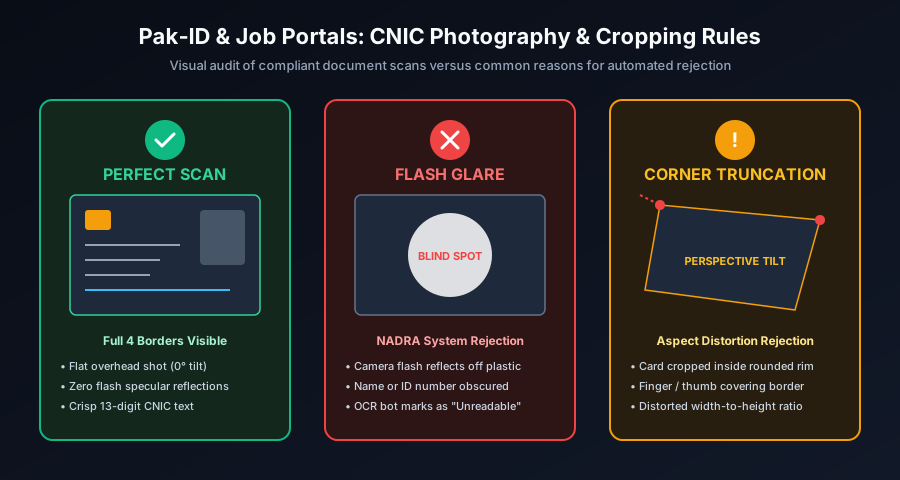
Over 80% of rejected CNIC uploads are caused by three basic, avoidable photography errors:
Deadly Sin 1: Camera Flash Reflections (The "Blind Spot")
Smart CNICs are coated with a high-gloss, scratch-resistant polycarbonate laminate. Snapping a photo with smartphone camera flash enabled produces a blinding white specular reflection. If this flash hotspot covers even a single digit of your 13-digit identity number (e.g. 42101-*******-1) or obscures the card expiry date, automated Optical Character Recognition (OCR) bots fail to read the file, and human reviewers will disqualify the document.
Fix: Disable camera flash completely. Position your card next to an open window during daylight hours. Diffused ambient light illuminates the card evenly without creating shiny hotspots.
Deadly Sin 2: Severe Perspective Tilt (Trapezoid Skew)
Holding your smartphone at a 45-degree angle while snapping a photo resting on your lap turns the rectangular card into a distorted trapezoid. Selection board algorithms detect non-parallel borders and reject the image for "Geometry Mismatch."
Fix: Place the CNIC on a dark table or book. Hold your phone strictly parallel to the surface (90 degrees overhead). Most phone camera apps display a yellow level crosshair when the phone is perfectly flat.
Deadly Sin 3: Cropping Corners or Covering Edges with Fingers
Holding the card between your thumb and index finger while taking a photo covers critical security Guilloche lines and state emblems. Similarly, cropping too tightly inside the card edges removes the rounded corners that prove the card is an authentic physical document.
Fix: Lay the card flat. Leave a neat 2mm to 4mm border around all four rounded corners when cropping.
5. How to Merge Front and Back Sides onto One Page Perfectly
To satisfy portals like FPSC, SPSC, and KPPSC that demand both sides of your identity card on a single document, follow this straightforward compositing method:
The Vertical Stack Compositing Method
- Capture two individual photos: one of the Front Side and one of the Back Side under identical daylight conditions.
- Crop each image neatly around its four rounded corners.
- Open Pagla Tool JPG to PDF. Add both images. Set page size to
A4withPortraitorientation. The tool will place both scans in a clean, vertical sequence on a standardized page. - If the portal specifically demands a single JPEG image rather than a PDF, use our Image Resizer to set a unified canvas measuring
600 × 800 pixels, paste the front on the top half and the back on the bottom half, and export as JPEG. - Run the composite image through our 50KB Image Compressor or 20KB Image Compressor to meet the portal's strict file ceiling.
6. Digital Security: Masking Sensitive Fields on Public Job Boards
Your CNIC contains highly sensitive personal information, including your family tree link (father's or husband's name), permanent residential address, date of birth, and biometric chip data. While you must submit unmasked, complete copies to official government agencies (NADRA, FPSC, PPSC), you should exercise extreme caution when applying on private third-party job boards (such as Rozee.pk, Indeed, or unverified private recruitment agencies).
For non-governmental private employers:
- Mask the Family Tree Number: Draw a neat black rectangle over the family number printed near the back barcode.
- Watermark with Purpose: Add a semi-transparent text watermark across the center: "FOR JOB APPLICATION AT [COMPANY NAME] ONLY - NOT FOR FINANCIAL USE".
- Never Upload Raw High-Res Scans to Cloud Converters: Always use local, client-side tools like Pagla Tool to prevent identity theft.
7. Step-by-Step Practical Mobile Workflow for Flawless Scans
Here is the proven, five-minute mobile procedure for digitizing your CNIC for any Pakistani portal:
Step 1: Set Up Your Flat Shooting Surface
Place a sheet of dark paper (e.g. dark blue or black construction paper) on a flat desk near a window. The high contrast between the dark paper and the green/white CNIC card makes edge cropping effortless.
Step 2: Position Your Phone Overhead
Switch your camera to 1× or 2× optical zoom (avoid digital zoom). Hold the phone directly above the card at arm's length to prevent your own shadow from falling across the card. Ensure flash is disabled.
Step 3: Tap to Focus & Snap Both Sides
Tap your phone screen directly on the 13-digit CNIC number to ensure laser-sharp focus and exposure lock. Snap the front side, flip the card, and snap the back side.
Step 4: Crop with Pagla Tool
Open Pagla Tool Image Resizer on your mobile browser. Crop each image with a small margin around the rounded corners.
Step 5: Compress to Target Limit
Drop the cropped image into Pagla Tool Compress to 50KB (or Compress to 20KB for PPSC). Download your compliant, crystal-clear file ready for instant submission.
8. Pakistani Recruitment & Admission Portals: Comprehensive Specification Matrix
Authoritative technical specifications across Pakistan's primary examination and document verification authorities:
| Issuing Body / Portal | Upload Requirement | Permitted Format | Max File Size | Resolution / Layout |
|---|---|---|---|---|
| NADRA Pak-ID Portal | Applicant Photo | JPEG | Max 500 KB | 350 × 467 px (300 DPI) |
| NADRA Pak-ID Portal | Supporting Docs / CRC | PDF or JPG | Max 1 MB | 200–300 DPI Color |
| FPSC (Federal Public Service) | CNIC Copy (Front & Back) | JPG | Max 30 KB | Both sides on 1 image |
| FPSC | Candidate Photograph | JPG | Max 25 KB | 140 × 190 pixels |
| PPSC (Punjab Public Service) | CNIC Front Side | JPG | Max 25 KB | Sharp, glare-free scan |
| PPSC | Candidate Photograph | JPG | Max 25 KB | Light blue or white bg |
| NTS (National Testing Service) | CNIC & Challan Slip | JPG or PDF | Max 500 KB | Clear bank stamp visible |
| HEC E-Services Portal | CNIC & Transcripts | Max 2 MB | Consolidated A4 dossier |
9. Frequently Asked Questions (FAQ)
Why does NADRA Pak-ID reject my photo with a 'Background not clear' error?
The NADRA Pak-ID automated biometric validation engine scans the pixel matrix for luminance variance and color uniformity around the candidate's silhouette. If you stand too close to a wall, harsh shadows create dark gradients. Similarly, uneven indoor lighting or yellowish tungsten bulb casts cause the automated edge segmentation model to fail. To pass, capture your photo against a flat, evenly illuminated white or light blue wall with 1-meter subject separation.
How can I merge the front and back of my CNIC into a single image for FPSC or PPSC?
Pakistani recruitment portals like FPSC and PPSC provide only one single upload field for your CNIC and mandate that both sides be visible on that single document. You can photograph both sides, crop them neatly using Pagla Tool's Image Resizer, and combine them into a single vertical page using our client-side JPG to PDF converter or image canvas stacking tool.
How do I take a clear photo of my CNIC without camera flash reflections?
Never use your phone's direct camera flash on a laminated CNIC or Smart Card. The glossy plastic surface reflects the intense point light source, creating a blinding white hotspot that obliterates your 13-digit CNIC number or birth date. Instead, place the card flat on a dark sheet of paper near a bright window receiving indirect daylight, and hold the phone completely parallel directly above the card.
What is the exact file size limit for CNIC uploads on PPSC and FPSC?
Both the Punjab Public Service Commission (PPSC) and Federal Public Service Commission (FPSC) enforce an extremely tight file size limit: your CNIC upload must be strictly less than 25 KB in JPEG format. Files exceeding 25KB will fail immediately at the browser form validation layer.
Can I crop out the rounded plastic edges of my CNIC card?
No. Never crop inside the physical boundaries of the card. Verification systems and manual scrutiny officers look for all four rounded corners to verify document authenticity. Always leave a small 2mm to 5mm margin around the entire card when cropping.
10. Conclusion & Pre-Upload CNIC Verification Checklist
Digitizing your CNIC for Pakistani government and educational portals does not require professional flatbed scanner hardware. By capturing images under diffused daylight, eliminating specular flash reflections, retaining all four rounded borders, and leveraging Pagla Tool's client-side compression, you ensure smooth, rejection-free submission on every portal.
Pre-Submission CNIC Audit Checklist
- ✓ 13-Digit CNIC Number: Crisp, clear, and unobstructed by flash glare or shadows.
- ✓ All 4 Corners Visible: Card borders fully captured without thumb occlusions or cut rims.
- ✓ Front + Back Included: Both sides composited if applying on FPSC or provincial PSC forms.
- ✓ Strict Weight Compliance: Under 25 KB for PPSC/FPSC or under 500 KB for NADRA Pak-ID.
- ✓ 100% Client-Side Privacy: Processed locally with zero transmission to unverified third-party cloud servers.