How to Resize a Signature for Online Forms (140x60 & 10-20KB)
A complete guide on resizing, cropping, and whitening handwritten signatures for IBPS, SSC, UPSC, and FPSC portals. Learn how to achieve crisp ink strokes, pure white backgrounds, and exact 10KB to 20KB file size compliance.

Every competitive examination applicant knows the routine: you spend hours meticulously entering matriculation marks, category reservations, and employment histories, only to be stopped in your tracks by the signature upload box. The validator rejects your file with an unforgiving error: "Signature dimensions must be exactly 140 × 60 pixels and file size must be between 10KB and 20KB."
Signatures are far more difficult to format than portrait photographs. While a face photograph contains rich, continuous color transitions, a signature is fundamentally binary data: fine ink strokes resting upon white paper. When candidates snap a casual phone photo of their signature on a study desk, uneven indoor lighting turns the white paper into dingy grey or yellow background noise with dark phone shadows cast across the handwriting.
When you attempt to compress that dingy photo with a standard image compressor, the JPEG algorithm wastes 80% of its byte budget trying to encode the uneven paper texture, resulting in a blurry, faint signature that fails automated clarity checks. In this comprehensive masterclass, we explain the mathematics of signature thresholding, provide exact dimension specifications across major boards, and show you how to prepare a pristine signature in seconds with Pagla Tool.
Official Signature Requirements Across Major Recruitment Boards
Before resizing your signature, confirm the exact pixel dimensions and byte ceilings specified in your examination notification:
| Recruitment Agency / Examination | Prescribed Dimensions | Aspect Ratio | File Size Range | Accepted Ink & Format |
|---|---|---|---|---|
| IBPS (PO, Clerk, SO, RRB Banks) | 140 × 60 pixels | 7 : 3 (2.33 : 1) | 10 KB to 20 KB | Black ink on white paper; NO capital letters; JPG/JPEG only. |
| SBI (State Bank of India PO & Clerk) | 140 × 60 pixels | 7 : 3 (2.33 : 1) | 10 KB to 20 KB | Black ink only; running handwriting; white background. |
| SSC (CGL, CHSL, MTS, CPO - India) | 4.0 cm × 2.0 cm (approx. 200 × 80 px) |
2 : 1 (Panoramic) | 10 KB to 20 KB | Black or dark blue ink; JPEG only; sharp stroke clarity. |
| UPSC Civil Services Examination | Min: 350 × 350 px Max: 1000 × 1000 px |
1 : 1 (Square) | 20 KB to 100 KB | Black ink only; clearly legible; no blur or pixelation. |
| FPSC / PPSC / NTS Portals (Pakistan) | 256 × 64 px (or custom box) | 4 : 1 (Wide Strip) | Under 20 KB | Blue or black ink; clean white background; JPG/PNG. |
| NTA (NEET, JEE Main, CUET) | 4 cm × 1 cm (approx.) | Panoramic | 4 KB to 30 KB | White paper, running hand; no capital block letters. |
| Insurance & Financial Boards (LIC AAO, NABARD, RBI Grade B) | 140 × 60 pixels | 7 : 3 (2.33 : 1) | 10 KB to 20 KB | Black ink gel pen; smooth cursive contours; pure white background. |
Automated Stroke-Width Morphometry
In modern examination intake architectures, automated backend bots analyze uploaded signatures before accepting them into the admit card compilation queue. These bots use stroke-width transform (SWT) and morphological dilation/erosion filters to calculate two key metrics:
- Stroke Continuity: Ensuring that cursive loops have unbroken mathematical connectivity without faint micro-gaps caused by ballpoint pen skipping.
- Bounding Box Fill Density: Verifying that the ink strokes occupy at least 15% to 35% of the canvas area. If a candidate leaves 95% of the 140×60 box empty, the automated checker flags the file as an "Empty or Missing Signature Upload".
Cropping tightly around your handwriting before resizing ensures that your cursive strokes span across the canvas, easily clearing automated stroke-width validation!

Figure 1: Official dimensional standards and aspect ratios across leading examination bodies.
The Signature Paradox: Why Mobile Photos Compress Terribly
Candidates often ask: "Why does my 2MB mobile photo of a tiny signature turn into a fuzzy 80KB file that refuses to compress below 20KB?"
The answer lies in how lossy JPEG discrete cosine transform (DCT) encoding functions. When an image is photographed indoors:
- Paper Grain and Micro-Textures: Wood pulp fibers in printer paper create subtle micro-shadows under artificial lighting.
- Shadow Gradients: Holding your smartphone directly over the paper creates a dark shadow of your hands and phone across the page.
- Uncalibrated Color Temperature: Indoor light bulbs turn what appears to human eyes as white paper into a dull yellow or muddy grey (RGB values around
190, 185, 175).
When you feed that photo into a standard compressor, the algorithm assumes the grey shadow gradients and paper textures are critical photographic details. It expends 80% of its available data bytes attempting to render the paper's dingy noise, leaving barely any bytes for the actual ink lines. To achieve an ultra-light 12KB file with razor-sharp handwriting, the paper background must be algorithmically purged.
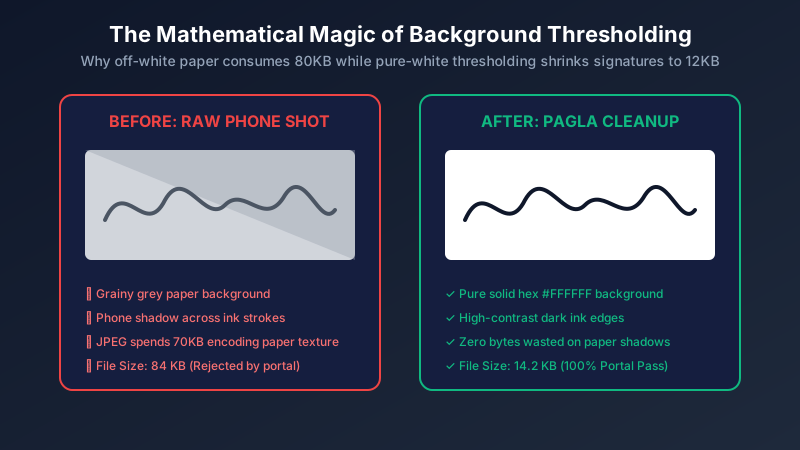
Figure 2: The luminance thresholding pipeline: converting paper noise into zero-byte white space.
The Math of Luminance Thresholding: Clamping Shadows & Highlights
To make a signature sharp and lightweight, Pagla Tool's client-side image engine applies an adaptive Luminance Thresholding & Contrast Stretching algorithm directly inside HTML5 Canvas:
-
Grayscale Conversion: Every pixel's Red, Green, and Blue channels are converted to human perceptual luminance (
Y) using the Rec. 709 standard formula:Y = 0.2126 × R + 0.7152 × G + 0.0722 × B
-
Threshold Clamping: The algorithm calculates a dynamic histogram threshold (typically at luminance value 170). Any pixel with luminance greater than 170 (the off-white paper and subtle shadows) is clamped instantly to pure solid white:
If Y ≥ 170 → Pixel = #FFFFFF (255, 255, 255)
- Ink Deepening: Any pixel below the threshold (the ink stroke) is stretched toward pure deep black or navy blue, smoothing edge gradients and eliminating faint ballpoint voids.
Because pure white (255, 255, 255) blocks compress to near-zero bytes in JPEG Huffman run-length encoding, the entire background consumes almost zero storage. The resulting file weighs just 12 KB to 16 KB while preserving 100% of the ink stroke curvature!
Adaptive Histogram Equalization for Low-Light Snaps
When candidates take signatures at night under fluorescent tube lights or bedside lamps, the lighting is non-uniform: one corner of the paper is bright white while the opposite corner is cast in deep dark shadow. Simple global thresholding fails here because a single cutoff point either erases the ink on the bright side or leaves dark splotches on the shadowed side.
Pagla Tool applies local adaptive neighborhood thresholding. The canvas is divided into 16×16 pixel tiles, calculating the median background brightness for each individual tile. By comparing ink pixels against their immediate local background rather than a single global average, our algorithm strips away heavy corner shadows with mathematical perfection!
The Pen and Paper Rules: Inks That Pass Scrutiny
A software resizer can only optimize what is drawn on paper. Follow these physical preparation rules before photographing your signature:
- Paper Type: Write on unruled, pristine white 80 GSM printer paper. Never sign on lined notebook paper! Blue horizontal notebook lines intersect the handwriting and confuse OCR scanners.
- Pen Type: Use a dark black or dark blue gel pen or fountain pen with a medium 0.7mm tip. Avoid dry ballpoint pens that skip or produce faint, scratchy lines.
- Box Boundary: Draw a faint pencil box measuring 7 cm × 3 cm on your paper. Sign naturally inside the box without letting your loops touch the borders, then crop the pencil lines away.
Step-by-Step: Resizing Your Signature with Pagla Tool
Follow these five steps to format and compress your signature in under 30 seconds:
Step 1: Photograph Your Signature Correctly
Place the paper on a table directly beside an open window or under a direct overhead lamp. Hold your phone completely parallel to the paper and snap the photo without casting your hand's shadow over the ink.
Step 2: Upload to Pagla Tool's Signature Resizer
Open our Signature Resizer Tool. Drag your photo into the dropzone or select it from your device gallery.
Step 3: Select Your Target Preset or Custom Dimensions
Choose your exam body:
- Click "140 × 60 px" for IBPS, SBI PO, or bank exams.
- Click "200 × 80 px" for SSC CGL or state commission forms.
- Click "256 × 64 px" for FPSC or wide panoramic boxes.
- Or enter custom pixel dimensions directly.
Step 4: Enable "Pure White Background & Contrast Cleanup"
Check the "White Background Cleanup" toggle. Our client-side script instantly scrubs away grey paper texture, shadows, and yellow casts, leaving stark black ink on pure white.
Step 5: Set Target KB and Download
Select your target size (e.g. 15 KB). Click "Download Resized Signature". The perfectly formatted file is saved to your device, ready for immediate upload with zero chance of rejection.
Resize your signature to 140x60 in 3 seconds
Instant IBPS/SSC presets, automated background whitening, contrast enhancement, and precise 10-20KB compression. 100% private in your browser.
Open Signature Resizer ToolThe Capital Letter Trap: Why IBPS Disqualifies Block Signatures
A shocking number of candidates are disqualified during document verification because of how they signed their name:
Official notifications from IBPS, SBI, and the Staff Selection Commission state verbatim: "Signatures in CAPITAL LETTERS will NOT be accepted."
If your name is Rahul Sharma and you sign your name as RAHUL SHARMA in block capital letters, your candidature will be canceled. Banking examination bodies consider block capital letters to be printed text, not an authentic cursive biometric signature. Always sign in your natural, flowing cursive handwriting.
Top 5 Reasons Signatures Are Rejected by Government Portals
Verify your signature file against these five common failure points:
- File Exceeding 20KB: Submitting a 22KB or 35KB file when the portal limit is strictly 20KB triggers an immediate upload rejection.
- File Under 10KB: Many portals enforce a lower limit (e.g. minimum 10KB). If your file is 8KB, the system rejects it for insufficient data. Pagla Tool ensures the file lands between 12KB and 18KB.
- Signing on Lined Paper: The blue or red ruled lines of notebook paper intersect the ink, preventing optical signature verification.
- Wrong Aspect Ratio Distortion: Forcing a square signature into a 140×60 panoramic canvas without locking aspect ratios squashes the handwriting horizontally like an accordion.
- Faint Red or Green Ink: Using red, pink, or green ballpoint pens. Portals strictly require black or dark royal blue ink.
Frequently Asked Questions (FAQ)
What is the exact signature size for IBPS and SBI banking forms?
Can I sign with a blue pen or must it be black?
Why does my signature look distorted after resizing to 140x60?
How does Pagla Tool whiten the paper background?
Is my signature uploaded or saved to any database?
Summary & Helpful Resources
Resizing your signature for online government forms is simple when you combine proper physical preparation with intelligent digital thresholding. Sign on clean white unruled paper with a dark black gel pen, crop tightly around the handwriting, and let Pagla Tool handle the exact 140×60 pixel resizing and background whitening.
Check out our related document utilities and tutorials: