How to Convert JPG to PDF on Mobile and PC (Free & 100% Private)
Whether compiling matriculation marksheets, bachelor degree transcripts, CNIC national ID cards, or employment experience certificates, official portals demand clean, standardized PDF files. Learn how to convert single and multi-page JPGs into professional A4 PDFs without risking document privacy on third-party cloud servers.
Merge Your Images into an A4 PDF in Seconds
Drag, reorder, adjust margins, and compile unlimited JPG photos into a single professional PDF document. Runs completely on your phone or PC with zero server uploads.
Open Free JPG to PDF Converter →1. Why Online Portals Mandate PDF Format
When applying for government employment (such as SSC CGL, UPSC Civil Services, FPSC, or provincial PSC examinations), admission to top universities, or international visas, applicants encounter multi-page document upload requirements. While individual candidate headshots and signatures are uploaded as JPEGs, supporting credentials—including academic transcripts, birth certificates, domicile records, and bank statements—must almost invariably be uploaded as a single PDF (Portable Document Format) document.
Online portals enforce PDF submission for three critical institutional reasons:
- Consolidation into a Single Digital Dossier: Instead of managing eight separate image uploads for a multi-semester university degree transcript, a PDF binds all pages into an orderly, sequential document that an adjudicator can scroll through seamlessly.
- Strict Page Size and Print Formatting: An image viewed on a web browser can render at varying zoom levels depending on the reviewer's monitor resolution. A PDF, by contrast, enforces an exact geometric physical canvas (such as ISO A4), guaranteeing that verification stamps, signatures, and margins print identically on institutional laser printers.
- Tamper Detection and Standardized Archiving: PDF/A standards ensure legal records remain viewable and verifiable across decades of software updates without risk of image corruption or formatting drift.
2. How JPGs Are Embedded into PDF Containers (Lossless DCT Streams)
Many students fear that converting an image to PDF will degrade the visual clarity of delicate college seals, registrar signatures, or grade tables. To understand why this fear is unfounded, consider how the PDF container specification handles raster imagery.
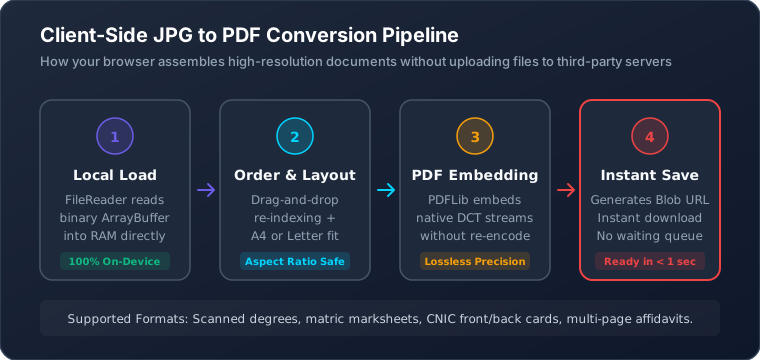
When you use a standards-compliant engine such as Pagla Tool's JPG to PDF Converter, the application does not uncompress your JPEG into a bloated raw pixel array and re-encode it. Instead, the PDF specification natively incorporates a specialized image stream filter known as /Filter /DCTDecode.
The converter extracts the raw binary JPEG payload—including its quantization tables, Huffman tables, and Discrete Cosine Transform frequency blocks—and wraps it cleanly inside a PDF Image XObject. The PDF wrapper simply instructs the document reader: "Display this exact JPEG bitstream at coordinate (X, Y) scaled to width W and height H." Because the JPEG stream is never decoded and re-compressed, there is zero generation loss. The image in the PDF is bit-for-bit identical to your original scanned photo.
3. ISO 216 A4 vs. US Letter Geometry & Margin Rules
One of the most frequent mistakes made when creating PDF files is selecting an improper page size. In digital typography and PDF generation, page dimensions are defined in PostScript Points, where 1 point equals exactly 1/72 of an inch:
| Standard | Physical Metric | Inches | PostScript Points (72 pt/in) | Primary Geographic Usage |
|---|---|---|---|---|
| ISO 216 — A4 | 210 × 297 mm | 8.27 × 11.69 in | 595.28 × 841.89 pt | Pakistan, India, UK, EU, Global (95%) |
| ANSI — Letter | 215.9 × 279.4 mm | 8.50 × 11.00 in | 612.00 × 792.00 pt | USA, Canada, Mexico |
| Fit to Image | Dynamic | Dynamic | Matches pixel aspect | Web viewing only (Not for printing) |
Why A4 is Critical: If you select US Letter when submitting documents to Pakistani or Indian government departments, the page is 17.6 mm shorter than standard A4 filing paper. When government administrative officers print your PDF dossier on standard A4 office printers, the bottom 17 mm of your document—frequently containing the official registrar seal, signature date, or serial number—can be clipped off!

4. Step-by-Step Conversion on Mobile (Android & iPhone)
The majority of students and applicants complete form submissions directly on smartphones. You do not need to download ad-ridden, battery-draining apps from app stores to create clean PDFs. Here is the streamlined mobile workflow:
- Photograph Your Documents Clearly: Place the document flat on a desk near a window. Avoid casting hand shadows. Frame the document so all four corners are visible, holding the phone directly parallel to the paper surface to eliminate trapezoidal distortion.
- Launch Pagla Tool in Your Mobile Browser: Open Chrome, Safari, or Firefox and go to Pagla Tool JPG to PDF.
- Tap "Choose JPG Images" or Drag: Select all the document images from your gallery. If you are uploading a 4-semester degree transcript, select all 4 images simultaneously.
- Check and Reorder Page Sequence: Our mobile interface renders thumbnail cards for every selected image. Review the page order. If Page 3 appears before Page 2, tap and drag the card into its correct chronological position.
- Configure Page Size and Margins: Select A4 as the page size. Set margins to Standard (20pt) so your documents feature a clean professional border suitable for hole-punching and binder storage.
- Generate and Save: Tap "Convert & Download PDF". The browser compiles the PDF locally in under one second. Tap "Save to Files" or "Download".
5. Step-by-Step Conversion on Windows & Mac Computers
On desktop computers and laptops, managing high-volume scans (such as a 12-page research publication or an extensive academic portfolio) is exceptionally fast thanks to desktop multi-file drag-and-drop:
- Select All in File Explorer / Finder: Open your folder containing scanned certificate JPEGs. Press
Ctrl + A(Windows) orCmd + A(Mac) and drag the entire batch into the Pagla Tool drop area. - Orientation Adjustment: If your certificate is in landscape format (wider than tall) while your marksheet is portrait, our client-side compiler automatically calculates the aspect ratio of each individual page and auto-orients the corresponding PDF page so you never submit sideways documents.
- Instant File Verification: Once generated, click the downloaded PDF to open it in your browser's native PDF reader. Verify that every page number matches and text remains razor-sharp at 200% zoom.
6. Merging Front & Back Documents (CNIC, Driving License, Degree)
One of the most frequent rejection triggers on NADRA, DGIP, passport, and banking portals is submitting the front and back of a National Identity Card (CNIC) or Driving License as two unassociated files. Many portals provide only a single upload button titled "Upload Scanned CNIC / ID Document (PDF Only)".
How to Create a Flawless 2-Page or Single-Page ID PDF
1. Take high-resolution photos of both the front side and reverse side of your CNIC or identity card.
2. Crop each image closely around the card borders using Image Resizer.
3. Load both images into JPG to PDF with Front as Page 1 and Back as Page 2.
4. Choose A4 page size with centered margins. The output is a crystal-clear, two-page PDF dossier that passes verification instantly.
7. Optimizing Output PDF Size Under Strict 1MB / 2MB Caps
Government recruitment servers enforce strict maximum file payload limits—typically 1MB or 2MB for PDF documents. If an applicant compiles 6 uncompressed camera photos (each weighing 3MB) directly into a PDF, the final PDF will weigh 18MB and fail to upload.
To guarantee your multi-page PDF remains comfortably below portal limits without compromising legibility, follow this mathematical sizing rule:
- Target Single Page Size: Divide the portal limit by the number of pages. For a 2MB limit across 8 pages, each page should weigh no more than
2000KB / 8 = 250KB. - Pre-Compress Individual Pages: Before compiling into PDF, run raw 4MB phone captures through our Image Compress 200KB tool. This rescales the image to ~1600×2200 pixels at 85% JPEG quality, dropping each page to ~150KB while keeping fine text crisp.
- Result: An 8-page compiled PDF will weigh approximately 1.2MB, sailing smoothly through the portal's upload validator.
8. Cloud Converters vs. 100% Client-Side Privacy
Most popular online "free PDF converters" operate on a centralized cloud model. When you upload a document, your files are transmitted across the internet to their remote servers, stored in temporary directories, converted via server-side software (such as ImageMagick or Ghostscript), and sent back to you.
When handling highly sensitive personal credentials—such as your National Identity Card, passport bio-data page, academic degrees, or domicile affidavits—cloud uploads introduce serious risks of data breaches, scraping, and identity theft.
| Security & Performance Metric | Traditional Cloud Converters | Pagla Tool Client-Side Engine |
|---|---|---|
| Where Files Are Processed | Remote third-party cloud servers | 100% inside your device's browser |
| File Upload Over Network | Full upload required (slow on mobile) | Zero bytes uploaded to any server |
| Data Retention / Logging | Stored in server temp folders for hours | Impossible: No server receives files |
| Conversion Speed | Queued behind other users; 10–45 sec | Instantaneous (< 1 second in RAM) |
| Daily Usage Caps / Paywalls | Often limited to 2 files/day unless paid | 100% Free & Unlimited Forever |
9. Frequently Asked Questions
Will converting my JPG to PDF reduce its visual clarity or resolution?
No. When using modern client-side PDF compilers like Pagla Tool (powered by PDFLib), the original JPEG image's DCT-encoded data stream is directly embedded inside a PDF image XObject dictionary using /Filter /DCTDecode. Because the JPEG stream is copied into the PDF binary without re-encoding, there is zero generational loss or degradation in image sharpness.
Can I merge multiple images into one multi-page PDF document?
Yes. Pagla Tool's JPG to PDF converter allows you to select dozens of photos, certificates, and marksheet scans at once. You can drag and drop cards to reorder pages intuitively before compiling them into a single, unified PDF document ready for submission.
Which page format is preferred by Indian and Pakistani government portals: A4 or US Letter?
ISO 216 standard A4 (measuring 210 x 297 mm, or 595.28 x 841.89 PostScript points) is the mandatory standard across South Asian government departments, universities, and banks. US Letter (8.5 x 11 inches) is standard in North America. Always select 'A4' in your PDF options when submitting in Pakistan or India.
Is it safe to convert private documents like passports and CNIC cards online?
Traditional online PDF converters upload your confidential documents to their remote cloud servers, creating substantial privacy and identity theft risks. Pagla Tool operates 100% inside your web browser using HTML5 Web APIs and JavaScript. Not a single byte of your file is ever transmitted over the network.
How can I prevent the generated PDF from exceeding a 2MB portal limit?
If you are merging 5 to 10 scanned pages, ensure each individual JPG scan is optimized before compilation. Run your scans through our Image Compress 200KB tool to bring each page down to ~150KB. When compiled, a 6-page PDF will weigh under 900KB, easily passing portal upload ceilings.
10. Conclusion & Document Checklist
Converting scanned JPG images to standardized PDF files is an indispensable skill for students, job applicants, and professionals. By understanding ISO A4 page geometry, taking advantage of lossless JPEG stream embedding, and utilizing 100% private client-side utilities, you can assemble pristine, multi-page document dossiers that guarantee immediate portal verification.
Before hitting submit on your application, verify our Pre-Submission PDF Checklist:
- All pages are oriented right-side up (no sideways or upside-down scans).
- Page dimensions are configured to ISO A4 with standard margins.
- Chronological sequence is correct (e.g., Matriculation before Intermediate before Graduation).
- Total file weight is verified under the portal ceiling (≤ 1MB or ≤ 2MB).
- No sensitive documents were leaked to third-party cloud servers during conversion.