JPG vs PNG vs WebP: Which Image Format to Use for Online Forms
Every year, hundreds of thousands of competitive exam applicants and job seekers encounter abrupt upload errors. Learn the technical science behind image compression codecs, why government portals reject modern WebP files, when PNG ruins file weight limits, and why standard JPEG remains the non-negotiable benchmark.
Need to Convert WebP or PNG to Compliant JPG Right Now?
Avoid portal rejection by resizing, converting, and compressing your photo or signature instantly. Run client-side in your browser with zero data uploads.
Launch Free Image Resizer & Converter →1. The Core Architecture of Image Formats
When you capture a photograph of your face with a modern smartphone camera, the image sensor captures millions of raw photons, converting them into a massive uncompressed raw bitmap. A typical 12-megapixel smartphone camera sensor captures an image grid measuring 4000 pixels wide by 3000 pixels high. In 24-bit TrueColor mode (where 8 bits are allocated for Red, 8 bits for Green, and 8 bits for Blue), every individual pixel consumes exactly 3 bytes of raw memory. Multiplying 12,000,000 pixels by 3 bytes yields a file footprint of 36 Megabytes.
Attempting to submit a 36MB uncompressed image to a government job portal or university examination server would instantly crash the receiving server's application memory pool. Server administrators therefore establish strict file size caps—typically between 20KB and 100KB. To bridge the astronomical gap between a 36MB camera sensor output and a 50KB portal ceiling, digital image compression algorithms were invented.
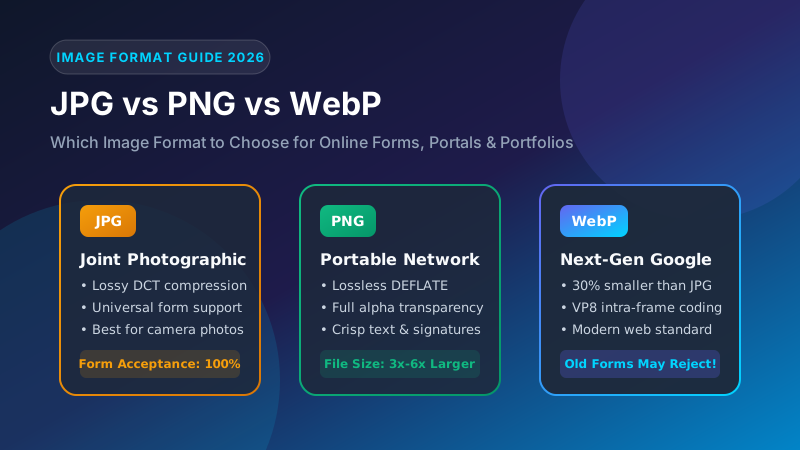
The fundamental differentiator among JPG, PNG, and WebP is not merely their file extensions, but the underlying mathematical algorithms each format employs to analyze, compress, and reconstruct pixel matrices. Understanding how each codec handles image frequencies determines whether your document upload succeeds effortlessly or stalls in frustrating rejection.
2. JPEG (JPG): The Universal Ruler of Government Portals
Standardized in 1992 by the Joint Photographic Experts Group, the JPEG (commonly designated with the three-letter extension .jpg) format is an ingenious lossy compression standard tailored specifically to exploit the biological limitations of the human visual system.
The Mathematical Engine Behind JPEG
Human eyes possess millions of rod cells (which detect light intensity, luminance, and contrast) but far fewer cone cells (which perceive chrominance and fine color subtleties). JPEG capitalizes on this anatomical asymmetry through a multi-stage pipeline:
- Color Space Transformation (RGB to YCbCr): The red, green, and blue components of each pixel are mathematically mapped into Luminance (Y), Blue Chrominance difference (Cb), and Red Chrominance difference (Cr).
- Chroma Subsampling (4:2:0 or 4:2:2): Because the human brain barely notices subtle color shifts across adjacent pixels, the codec discards half or three-quarters of the color information while keeping 100% of the sharpness and brightness detail intact.
- Discrete Cosine Transform (DCT): The image is subdivided into uniform blocks of 8×8 pixels. The DCT converts these spatial brightness values into frequency coefficients, isolating low-frequency features (smooth cheek contours, solid backgrounds) from high-frequency details (hair strands, iris edges).
- Quantization Matrix: This is where file compression genuinely occurs. The high-frequency coefficients are divided by values in a quantization table and rounded to the nearest integer. High-frequency noise is rounded to zero, allowing Huffman entropy encoding to pack the remaining data into a remarkably tiny byte payload.
Why Portals Demand JPG: Because continuous-tone human faces naturally consist of subtle gradients and soft transitions, JPEG compresses portraits down to 20KB–50KB with virtually imperceptible degradation. Furthermore, every browser, web server, and PDF compiler built over the last 30 years includes native C/C++ libraries capable of decoding standard baseline JPEG streams in milliseconds.
3. PNG: Pixel Precision vs. File Size Explosion
Created in 1996 as an open-source successor to the patented GIF format, PNG (Portable Network Graphics) was engineered for absolute pixel fidelity. Unlike JPEG, PNG is fundamentally a lossless image codec.
The DEFLATE Compression Algorithm
PNG relies on a two-stage encoding pipeline. First, it applies row-by-row predictive delta filtering (such as Sub, Up, Average, or Paeth filters) to minimize byte variances across neighboring pixels. Second, it compresses the filtered data using the standard DEFLATE algorithm—the exact same LZ77 and Huffman coding engine utilized inside ZIP archives.
Because PNG never discards frequency data, every single pixel reconstructed upon decompression matches the original image with 100% mathematical perfection. Additionally, PNG supports an 8-bit alpha channel, providing 256 gradations of transparent and semi-transparent pixels.
The "PNG Trap" on Form Submissions
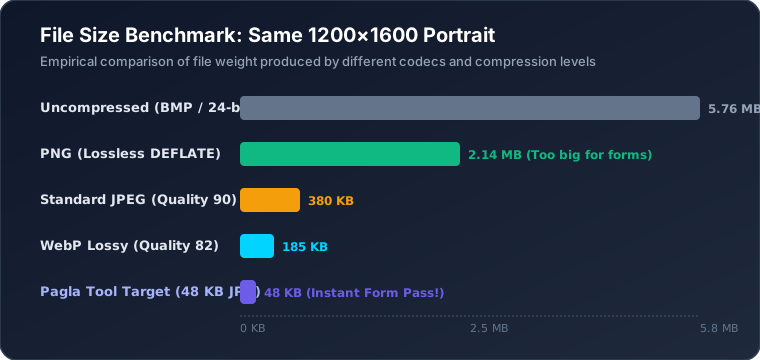
Applicants frequently scan their handwritten signature or passport photograph, save it as a 24-bit PNG, and wonder why the portal rejects the file for exceeding the 20KB limit. Because photographic portraits contain continuous sensor noise, micro-textures, and skin pores, the LZ77 dictionary cannot find repetitive byte patterns. A passport photo that compresses to 35KB in JPEG will inflate to 380KB to 1.2MB in PNG!
4. WebP: Next-Gen Miracle and Why Old Portals Block It
Announced by Google in 2010, WebP was designed to be the definitive image format for the modern world wide web. Built upon the intra-frame prediction technology of the VP8 video codec, WebP provides both lossy compression (derived from VP8 keyframes) and lossless compression (utilizing advanced entropy coding, color transform matrices, and spatial subtraction).
Empirical research from Google demonstrates that lossy WebP files are on average 25% to 34% smaller than comparable JPEG images of identical Structural Similarity Index (SSIM) quality. WebP achieves this dramatic efficiency by analyzing 16×16 macroblocks, predicting pixel colors based on adjacent decoded sub-blocks, and compressing only the residual error differences.
Why Modern WebP Fails on Recruitment Portals
If WebP is technically superior to JPEG in both file weight and visual fidelity, why do government portals for UPSC, SSC, IBPS, NTS, and FPSC reject it? The reason is rooted in server-side legacy infrastructure:
- Outdated Image Processing Libraries: Numerous examination backends were architected between 2005 and 2015. Their server applications utilize older C++ libraries, Java AWT image readers, or PHP 5.x GD installations that do not have
libwebpcompiled into their server binary. - Downstream PDF Generation Pipelines: After you submit your application, portal servers generate an official Admit Card, Hall Ticket, or Application Summary PDF. Classic server-side PDF generators (such as FPDF or older iText versions) can embed native JPEG DCT byte streams directly into PDF documents without re-encoding, but crash immediately when attempting to inject WebP chunks.
- Strict Whitelist File Validation: Portal firewalls and upload scripts check MIME types against rigid configuration files that permit only
image/jpegandimage/jpg.
5. Technical Comparison & Benchmark Matrix
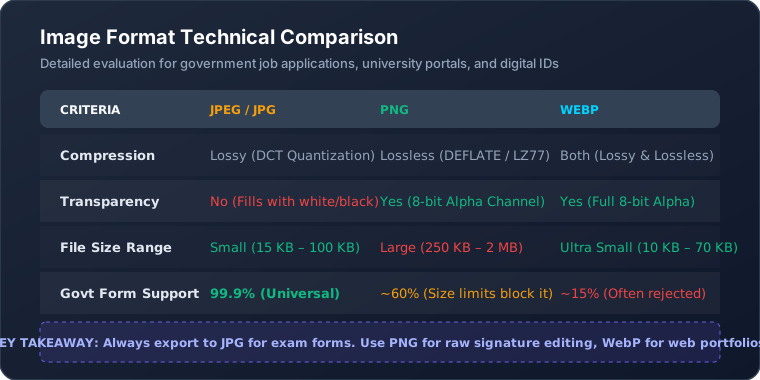
To help you choose the ideal format for every application scenario, here is a detailed technical breakdown across key imaging metrics:
| Feature / Metric | JPEG / JPG | PNG | WebP |
|---|---|---|---|
| Primary Codec Mode | Lossy (DCT) | Lossless (DEFLATE) | Lossy (VP8) & Lossless |
| Alpha Transparency | No (Solid background) | Yes (Full 8-bit Alpha) | Yes (Full 8-bit Alpha) |
| Color Space Support | sRGB, CMYK, Grayscale | sRGB, Indexed, Grayscale | sRGB (YUV420) |
| Typical Portrait File Size | 20 KB – 60 KB | 300 KB – 1.5 MB | 15 KB – 45 KB |
| Ideal Candidate Document | Passport Photo, ID Scans | Raw Signature Master | Website UI & Portfolios |
| Govt Portal Acceptance | 100% Universal | ~50% (Size issues) | < 15% (Often rejected) |
| Generation Loss Risk | Yes (Re-saving degrades) | Zero (Mathematically exact) | Yes (In lossy mode) |
6. Why Servers Throw "Invalid Format" Errors (Behind the Scenes)
Many applicants attempt a quick workaround: they take a modern .webp downloaded from the internet or a .png screenshot from their phone and simply rename the file extension to photo.jpg in their file manager. When they attempt to upload this renamed file, the portal promptly throws an error: "Uploaded file is corrupted or not a valid image."
This occurs because server-side security architectures inspect the file's binary signature, known as Magic Bytes:
- True JPEG Files: The very first two bytes in the file must be hexadecimal
0xFF 0xD8(representing the Start of Image / SOI marker), and the final two bytes must be0xFF 0xD9(End of Image / EOI marker). - PNG Files: The initial 8 bytes of every valid PNG file contain the signature
0x89 0x50 0x4E 0x47 0x0D 0x0A 0x1A 0x0A. - WebP Files: The first 4 bytes specify
RIFF(0x52 0x49 0x46 0x46), followed by 4 bytes of file length, followed immediately byWEBP(0x57 0x45 0x42 0x50).
When an application server receives a file labeled passport.jpg, it executes a binary header inspection using functions like PHP's finfo_file() or Linux's mime_content_type(). If it reads the RIFF...WEBP header on a file claiming to be a JPEG, the server recognizes a MIME-type mismatch, suspects malicious payload spoofing, and immediately blocks the upload.
7. How to Convert Any Image to Portal-Safe JPG on Mobile & PC
To guarantee 100% acceptance across all government, bank, and university portals, convert your image into a true baseline JPEG with compliant dimensions and an optimal compression ratio. Here is the recommended zero-cost procedure:
- Open Pagla Tool's Image Resizer: Navigate to the Custom Image Resizer. The tool operates 100% inside your browser's JavaScript engine, so your sensitive photo never leaves your device.
- Select or Drag Your Image: Drop your existing WebP, PNG, HEIC, or uncompressed smartphone camera photo into the drop zone.
- Configure Target Dimensions: If your portal requires specific pixel dimensions (for instance, 413×531 px for a 3.5×4.5 cm passport photo or 140×60 px for an SSC signature), enter these exact numbers.
- Select Export Format as "JPG": Ensure the output format selector is set to JPG. The tool's canvas pipeline will automatically composite any transparent background pixels over a crisp white background and encode true JPEG SOI headers.
- Set Target File Weight: If the portal enforces a strict cap (such as ≤ 20KB or ≤ 50KB), use our dedicated Image Compress 20KB or Image Compress 50KB tools to run binary search DCT quantization.
- Download and Upload: Click "Download Processed Image". The resulting file contains clean headers, zero EXIF GPS tags, and a perfectly compliant file size.
8. Frequently Asked Questions
Why do government recruitment portals reject WebP images?
Most recruitment portals in India and Pakistan (such as SSC, UPSC, NTS, and FPSC) operate on legacy server stacks powered by older versions of PHP GD, Java Servlet image filters, or classic ASP. These backend systems rely on MIME-type sniffing and libjpeg decoding libraries built prior to native WebP support. When a WebP file is uploaded—even if renamed with a .jpg extension—the server detects non-matching magic bytes and rejects the upload.
Can I convert a PNG image to JPG without losing image sharpness?
Yes. When converting a high-resolution PNG to JPG, set the JPEG quality factor between 88% and 92%. At this compression ratio, high-frequency spatial color details are preserved while eliminating the heavy uncompressed raster data of PNG. Because JPEG does not support transparency, ensure your converter composites any transparent alpha pixels against a pure white background (#FFFFFF) rather than defaulting to solid black.
Why is my PNG signature file always rejected for exceeding the 20KB limit?
PNG uses the DEFLATE lossless compression algorithm, which stores indexed pixel values without discarding subtle variations in lighting, paper grain, or scanner noise. Even a small 200x80 pixel signature saved as a 24-bit PNG frequently weighs 40KB to 120KB. Converting the signature to an optimized JPEG at 80% quality immediately shrinks the payload down to 8KB to 14KB while keeping the handwritten ink strokes sharp.
Is JPEG and JPG the exact same format?
Yes, JPEG and JPG are 100% identical. The distinction exists purely because early MS-DOS and Windows FAT16 file systems enforced an 8.3 filename restriction requiring three-letter file extensions (.jpg), whereas Unix and Macintosh environments supported four-letter extensions (.jpeg). Both utilize the identical JFIF container format and ISO/IEC 10918-1 compression standard.
Does saving a JPG file repeatedly reduce its visual quality?
Yes, repeated saving causes generation loss. Because JPEG is a lossy codec, every time an image is opened, recompressed, and saved as JPEG, the Discrete Cosine Transform (DCT) recalculates 8x8 pixel blocks, re-quantizes high-frequency data, and introduces additional compression artifacts. To avoid degradation, perform all crops and adjustments in a single pass using client-side canvas tools.
9. Conclusion & Best Practices
While modern formats like WebP and AVIF deliver outstanding performance across web browsers and responsive mobile applications, standard JPEG (JPG) remains the non-negotiable gold standard for official form submissions. Its universal backward compatibility, predictable lossy compression ratios, and seamless integration with legacy PDF generators ensure your application will never be blocked by backend parsing errors.
Whenever you prepare photos, academic transcripts, or signatures for government portals:
- Never upload WebP or AVIF files directly to government servers.
- Avoid PNG for photographic portraits to prevent exceeding strict 20KB–50KB size thresholds.
- Export your final files as baseline JPEG with an 80%–90% quality factor using client-side canvas tools that strip unneeded EXIF data.