Government Job Form: Common Photo and Signature Mistakes & Technical Fixes
Unpack the exact algorithmic and clerical reasons why over 200,000 candidates get disqualified annually on SSC, UPSC, FPSC, and PPSC portals, and how to fix them in seconds.

Table of Contents
- 1. The Disqualification Funnel: How AI Bots Scrutinize Millions of Applicants
- 2. The 7 Deadly Photograph Traps That Trigger Instant Rejection
- 3. The 5 Fatal Signature Mistakes (and the Lined Paper Disaster)
- 4. Date of Photo (DOP) & Name Stamp Rules Explained
- 5. Facial Aspect Ratio Geometry: Why Squished Photos Fail Biometric Gates
- 6. Solving the Strict 10KB to 20KB File Weight Dilemma
- 7. Step-by-Step Workflow: Preparing a Flawless Application Asset Pair
- 8. Major Examination Boards: Dimension & Formatting Criteria Matrix
- 9. Frequently Asked Questions (FAQ)
- 10. Conclusion & Pre-Submission Asset Audit Checklist
1. The Disqualification Funnel: How AI Bots Scrutinize Millions of Applicants
When notifications are released for marquee civil service and public recruitment examinations—such as the Staff Selection Commission (SSC CGL / CHSL), Union Public Service Commission (UPSC), Banking Personnel Selection (IBPS), Railway Recruitment Board (RRB) in India, or the Federal Public Service Commission (FPSC) and Punjab Public Service Commission (PPSC) in Pakistan—portals are overwhelmed by astronomical applicant volumes, frequently exceeding 2 to 5 million candidates for a few thousand gazetted vacancies.
No government department possesses the human staffing required to manually review millions of individual profile photos and signatures. Instead, modern government application portals utilize a multi-tier automated scrutiny funnel:
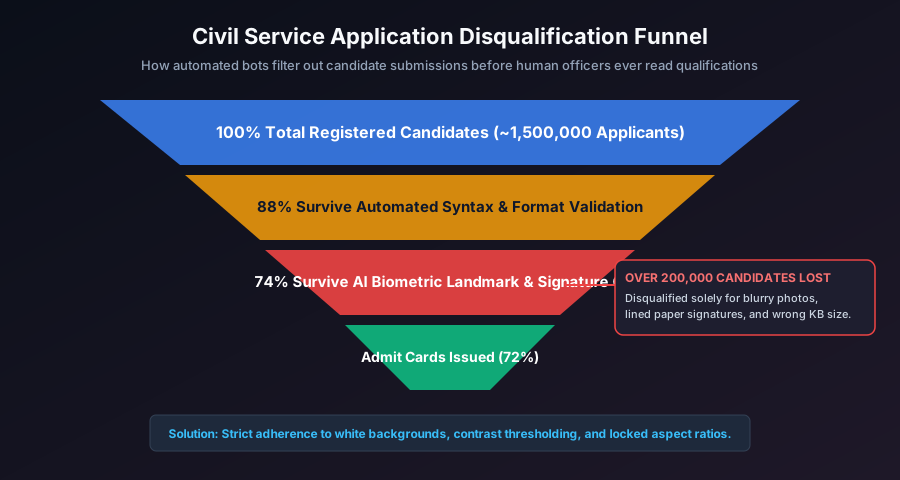
- MIME-Type & Byte Dimension Filter: Checks file headers, magic bytes, and enforces strict minimum/maximum kilobyte limits (e.g.
20 KB ≤ Size ≤ 50 KB). Files failing this check cannot even be submitted. - Automated Computer Vision (CV) Audit: High-speed neural networks (such as OpenCV Haar cascades and dlib facial landmark models) scan the uploaded image matrix. They evaluate facial symmetry, head tilt angles, eye openness, pupil visibility, and background color variance.
- Optical Character Recognition (OCR) Signature Binarization: Evaluates signatures for contrast, presence of background ruling lines, and capital letter compliance.
If your uploaded files trigger algorithmic flags, your application is marked "Disqualified / Rejected at Scrutiny Stage." Your fee is forfeited, and you forfeit an entire recruitment cycle.
2. The 7 Deadly Photograph Traps That Trigger Instant Rejection
Data from recruitment board audit reports reveals seven persistent photographic errors:
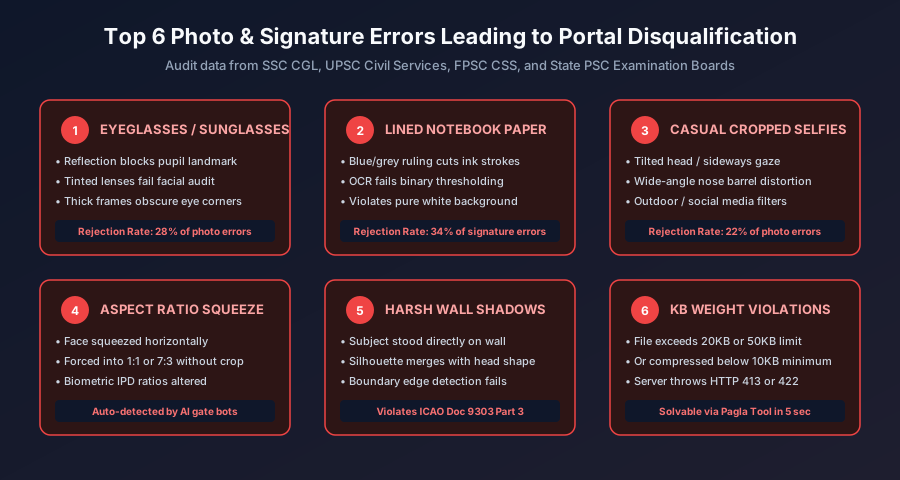
1. Casual Smartphone Selfies
Cropping a photo from an Instagram story, wedding snapshot, or casual outing is strictly forbidden. Front-facing smartphone cameras introduce severe barrel distortion that swells facial anatomy, and handheld selfies result in a tilted neck axis. The camera must look directly straight at the subject with eyes parallel to the horizon.
2. Eyeglasses, Glares & Sunglasses
Recent notifications from SSC and Indian exam authorities have banned eyeglasses entirely due to persistent issues with reflective lens glare, anti-glare chromatic coating reflections, and heavy frames that conceal eye corners. Dark sunglasses cause instant disqualification.
3. Caps, Hats & Religious Headwear Occlusions
Caps, beanies, hoods, and sports headwear are prohibited. While religious head coverings (such as the Islamic hijab or Sikh turban) are fully permitted, they must not cast shadows over the forehead or obscure any part of the facial oval from hair vertex to chin base.
4. Busy, Textured, or Colored Backgrounds
Portals demand a monochromatic, solid background (pure white or pale blue). Photos taken against wallpaper, patterned curtains, outdoor gardens, or brick walls are rejected by automated background-segmentation algorithms.
5. Anamorphic Aspect Ratio Distortion
Forcing a rectangular 3:4 portrait into a square 1:1 box without proportional cropping horizontally squishes the applicant's skull, corrupting inter-pupillary distance measurements.
6. Outdated Photographs
Uploading a 3-year-old high school photo when you are 24 creates a severe facial landmark discrepancy. If the candidate's physical appearance at the exam hall does not match the biometric admit card, entrance is barred on suspicion of impersonation.
7. Harsh Background Silhouettes & Eye Shadows
Standing flush against a bedroom wall casts a dark, sharp shadow directly behind your neck. Similarly, overhead room bulbs create deep shadows in eye sockets ("raccoon eyes"), breaking AI facial edge segmentation.
3. The 5 Fatal Signature Mistakes (and the Lined Paper Disaster)
Signatures account for almost half of all administrative document rejections. Candidates frequently treat signatures casually, making these critical errors:
1. The Lined Notebook Paper Disaster
Over 35% of signature rejections occur because the candidate signed their name in a lined exercise book or notebook. Horizontal grey or blue ruling lines cut directly across the loops and ascenders of the handwritten ink. When portal OCR engines binarize the image, these lines confuse the character segmentation algorithm, triggering an automated "Signature Unclear / Obscured" error.
2. Signing in All Capital / Block Letters
Recruitment brochures explicitly state: "Signatures in CAPITAL LETTERS will NOT be accepted." A signature is a personalized, continuous cursive legal mark. Writing your name in block letters (e.g. MUHAMMAD USMAN or ROHIT SHARMA) is legally classified as hand-lettered print, not a verifiable signature.
3. Faint Blue Gel Ink on Off-White Paper
Using light blue ink or writing with a drying ballpoint pen produces faint, semi-transparent strokes. When compressed into a 10KB to 20KB JPEG file, subtle blue strokes wash out and dissolve into JPEG DCT block noise.
4. Smartphone Shadows Falling Across the Signature
Holding a phone directly above a sheet of paper under ceiling lighting casts the phone's square silhouette directly over the ink. This gradient makes it impossible for image processors to cleanly threshold the background to pure white.
5. Mismatched Signature at Document Scrutiny
Adopting an elaborate signature for the online form that you cannot reproduce with identical fluid strokes in the physical exam hall attendance register creates immense legal risk. Discrepancies between your online upload and exam hall signature trigger biometric fraud investigations.
4. Date of Photo (DOP) & Name Stamp Rules Explained
Several major testing authorities—including the Staff Selection Commission (SSC) in specific exam cycles and select state police recruitment boards—enforce a mandatory Date of Photograph (DOP) stamp rule:
How to Correctly Format a DOP Caption Box
When the official exam notification specifies that the photo must carry the candidate's name and date:
- The date printed must fall strictly within the 3-month window preceding the notification date.
- The text must sit inside a clean, rectangular white caption box positioned across the bottom 15% of the portrait.
- Text format:
Candidate Name [Line 1] / DOP: DD.MM.YYYY [Line 2]in legible black sans-serif font (e.g. Arial or Roboto). - Never write the date by hand with a pen over your clothes; use a clean digital caption overlay.
5. Facial Aspect Ratio Geometry: Why Squished Photos Fail Biometric Gates
When an online form instructs an applicant to upload an image measuring 140 × 190 pixels or 200 × 230 pixels, many candidates open basic painting tools, uncheck "Maintain Aspect Ratio", and force the pixel dimensions directly. This produces severe anamorphic distortion.
A natural human skull possesses fixed biometric proportions:
- Inter-Pupillary Ratio: Distance between pupils divided by outer face width.
- Vertical Golden Ratio: Distance from chin to nose base divided by distance from nose to brow line.
When software horizontally compresses a 4:3 portrait into an arbitrary rectangular box, these anatomical ratios warp. Automated facial recognition systems at exam gate turnstiles (now widely used across SSC, NTA JEE/NEET, and UPSC centers) will fail to match your live face against your warped admit card photo, resulting in administrative delays and potential disqualification.
6. Solving the Strict 10KB to 20KB File Weight Dilemma
Perhaps the most technically challenging requirement for candidates is satisfying the strict 10KB to 20KB file size bracket enforced by portals like SSC, UPSC, and State PSCs. Candidates face a razor-thin operational envelope:
- If the file weighs 20.1 KB, the form upload script rejects the file for exceeding the maximum payload.
- If the applicant compresses the image carelessly down to 8.5 KB, the form script rejects it for failing the minimum 10KB legibility floor.
- If the image is compressed with crude algorithms, JPEG compression noise dissolves text and facial edges into blurry mud.
The Binary-Search Canvas Solution
Pagla Tool eliminates this headache through automated binary-search client-side quantization. When you drop your signature into our Compress to 20KB Tool or Signature Resizer, our JavaScript engine dynamically adjusts JPEG quality factors in micro-increments until your file lands safely between 14KB and 18KB—safely within portal boundaries with maximum sharpness.
7. Step-by-Step Workflow: Preparing a Flawless Application Asset Pair
Follow this exact five-minute protocol to prepare certified, rejection-proof application assets:
Part 1: The Signature Setup
- Take an unruled, solid white A4 sheet of paper.
- Sign your name in fluid cursive script using a dark black ballpoint or micro-tip gel pen inside an imaginary 3:1 box.
- Place the sheet near a bright window receiving indirect daylight.
- Hold your phone directly parallel above the paper (using 2× zoom to prevent your own shadow from falling onto the ink).
- Open Pagla Tool Signature Resizer. Upload the image, select the 140×60 px preset (or custom portal bounds), enable high-contrast background cleanup, and download your pristine file.
Part 2: The Photograph Setup
- Stand 1 meter in front of a solid white or light blue wall in daylight.
- Remove eyeglasses, caps, and headwear occluding your hairline or ears.
- Have a family member capture the photo from eye level at a distance of 1.5 to 2 meters.
- Upload to Pagla Tool Passport Photo Maker. Crop the facial oval to occupy 70% to 80% of vertical height.
- Export as JPEG and confirm that the resulting file weighs comfortably between 20KB and 50KB.
8. Major Examination Boards: Dimension & Formatting Criteria Matrix
Authoritative technical specifications across premier Indian and Pakistani competitive examination authorities:
| Recruitment Body | Photo Dimensions & Size | Signature Dimensions & Size | Mandatory Rules |
|---|---|---|---|
| SSC (Staff Selection Comm.) | 100×120 to 140×190 px • 20–50 KB | 140×60 px • 10–20 KB | No spectacles; running script signature only |
| UPSC (Civil Services) | 350×350 px min • 20–300 KB | 1000×1000 px max • 20–300 KB | Clear frontal face; 3/4th face coverage |
| IBPS (Bank PO / Clerk) | 200×230 px • 20–50 KB | 140×60 px • 10–20 KB | Black ink signature; white background photo |
| FPSC (Pakistan Federal) | 140×190 px • < 25 KB | Combined with Challan/CNIC | Light blue or white bg; sharp iris clarity |
| PPSC (Punjab Public Service) | 140×190 px • < 25 KB | CNIC copy under 25 KB | Strict <25KB ceiling; zero upload retries |
| NTA (NEET / JEE) | 3.5×4.5 cm • 10–200 KB | 4×1.5 cm • 4–30 KB | 80% face coverage; white background |
9. Frequently Asked Questions (FAQ)
Why do exam portals reject signatures written on lined notebook paper?
When an application is processed by automated Optical Character Recognition (OCR) or binary edge detection filters, horizontal ruling lines on notebook paper intersect directly with the candidate's pen strokes. The thresholding algorithm cannot differentiate between the pre-printed paper rule and the handwritten signature, corrupting the feature extraction vector. Furthermore, during admit card generation, horizontal lines appear unsightly and unprofessional.
Can I sign my name using capital letters on a government job application?
No. Virtually all official recruitment bodies (including SSC, UPSC, IBPS, and State PSCs) explicitly state that signatures in CAPITAL / BLOCK LETTERS will be summarily rejected. A valid legal signature must consist of continuous running script. Block lettering cannot be verified for biometric handwriting identity during exam hall attendance or document verification.
What is the 'Date of Photo' (DOP) requirement on SSC and government forms?
Certain recruitment bodies (most notably the Staff Selection Commission in select recruitment cycles) require that the photograph be taken within three months of the notification date. In specific instructions, candidates are instructed to print their full name and the date of taking the photograph (e.g. 'DOP: 15.10.2026') in a neat white caption box at the bottom of the portrait. Failing to include this when explicitly mandated results in automatic disqualification.
Why was my photo rejected for 'Facial Geometry Mismatch' when I used the correct pixel size?
This occurs due to anamorphic aspect ratio distortion. For example, if your original camera photo has a 4:3 aspect ratio (e.g., 1200x1600 px) and you forcefully downscale it to 200x200 px (1:1 ratio) without cropping, your face gets squished horizontally by 25%. Modern portal AI systems analyze inter-pupillary distance and facial oval ratios; when they detect distorted anatomical proportions, they reject the upload.
What ink color should I use for government exam signatures?
Unless a portal explicitly specifies blue ink, crisp black ballpoint ink on unruled pure white paper is universally recommended. Black ink produces the highest contrast ratio against white paper, ensuring that the digital image converts into a razor-sharp, noise-free 1-bit or 8-bit image without grey fuzziness or compression artifacts.
10. Conclusion & Pre-Submission Asset Audit Checklist
Navigating the rigorous scrutiny filters of competitive civil service and banking portals requires meticulous attention to digital detail. Never let a clerical formatting mistake invalidate months of exhaustive academic study and exam preparation. By auditing your assets against these verified standards, your application is guaranteed to sail through preliminary scrutiny.
Pre-Submission Photo & Signature Audit Checklist
- ✓ Unruled White Paper: Signature executed on pure blank paper with zero lines.
- ✓ Running Cursive Script: Signature written in natural handwriting, not capital letters.
- ✓ Zero Spectacles / Sunglasses: Clean frontal gaze with unobstructed pupils.
- ✓ Solid Monochromatic Backdrop: Pure white or light blue with 1-meter subject-wall separation.
- ✓ Locked Proportions: Cropped prior to resizing; zero horizontal facial squeezing.
- ✓ Exact File Weight Compliance: Photos 20KB–50KB; signatures strictly 10KB–20KB.
- ✓ 100% Client-Side Processing: Formatted securely in your browser with zero server data retention.